
Getting started with AI is simpler than most people think. It’s not about mastering every new platform that launches. Instead, it’s about matching the right tool to the job you need to do right now. This guide will show you how to move from theory to action, helping you select the right tools, communicate with them effectively, and build powerful workflows that deliver real results from day one.
1. Choose the Right AI Tool for Your Goal
The sheer number of AI tools can feel overwhelming. The key is to ignore the hype and start with a clear objective. The goal isn’t to find the single “best” AI tool—it’s to find the best one for a specific task, whether that’s drafting ad copy, hunting down a bug in your code, or mocking up social media graphics. A developer’s perfect tool is going to look completely different from a marketer’s.

Alt text: Person pointing at a laptop screen displaying various AI tool icons, next to an orange ‘Right Ai tool’ sign.
This goal-first approach is essential. AI is no longer a novelty; it’s a standard part of business. By 2024, a staggering 72% of companies had already integrated AI into their operations, with generative AI use jumping to 65%. This tells us we’ve moved past experimentation and into daily, real-world application.
Step 1: Pinpoint Your Core Need
Before browsing tools, define the specific problem you want to solve. What’s the biggest bottleneck in your workflow? Be precise.
- Vague Problem: “I need help with marketing.”
- Specific Problem: “I spend three hours every week trying to write five unique social media posts for Instagram and LinkedIn, and they all end up sounding the same.”
Once you have a specific problem, you can identify the right category of tool.
- For Content Creation: You need an AI writer like Jasper for blog posts or an image generator like Midjourney for unique visuals.
- For Productivity and Automation: You need tools that handle repetitive tasks, like transcribing meetings with Otter.ai or connecting apps with Zapier. Our guide on AI tools for productivity offers more ideas.
- For Data Analysis: You need an AI that can analyze spreadsheets or customer data to find trends, like Julius AI.
Defining the pain point narrows your search from thousands of options to a manageable few.
Step 2: Evaluate Your Shortlist
With a clear need, you can compare top options. Look at three things: specialization, integration, and cost. Does the tool do one thing exceptionally well? Can it plug into the software you already use? A tool’s real power is how neatly it fits into your existing workflow.
Matching Your Role to the Right AI Tool Type
This table helps you map your job to the right kind of tool.
| Your Role | Primary Task | Recommended AI Tool Category | Example Platform Feature |
|---|---|---|---|
| Marketer | Writing social media posts or blog drafts | AI Content Writer | Template for “Ad Copy” or “Blog Outline” |
| Developer | Generating or debugging code snippets | AI Code Assistant | “Explain this code” or auto-completion |
| Sales Rep | Summarizing meeting notes & drafting emails | AI Productivity Assistant | “Generate follow-up email from transcript” |
| Data Analyst | Finding trends in large datasets | AI Data Analysis Platform | “Visualize sales data by region” |
| Designer | Creating unique visual assets quickly | AI Image Generator | Prompt-based image creation |
The best AI tool is the one you actually use. Prioritize simplicity and a clear use case over a long list of features you may never need. Start with a free trial to see if it genuinely solves your problem before committing.
This goal-oriented path helps you move past the hype and find a tool that delivers real results.
2. Master the Art of the Prompt
The quality of what you get out of an AI directly reflects the quality of what you put in. A vague, one-line request will return a generic, useless result. To get what you want on the first try, you need to stop making requests and start giving clear, structured instructions.
Think of an AI model as an incredibly talented but very literal intern. If you say, “write about AI,” it’s forced to guess the audience, tone, and goal. The result will be useless. But if you give it a detailed brief, it can produce exceptional work.
A 4-Step Framework for Effective Prompts
A powerful prompt provides absolute clarity. Use this four-part structure for your requests: Context, Role, Action, and Format (CRAF).
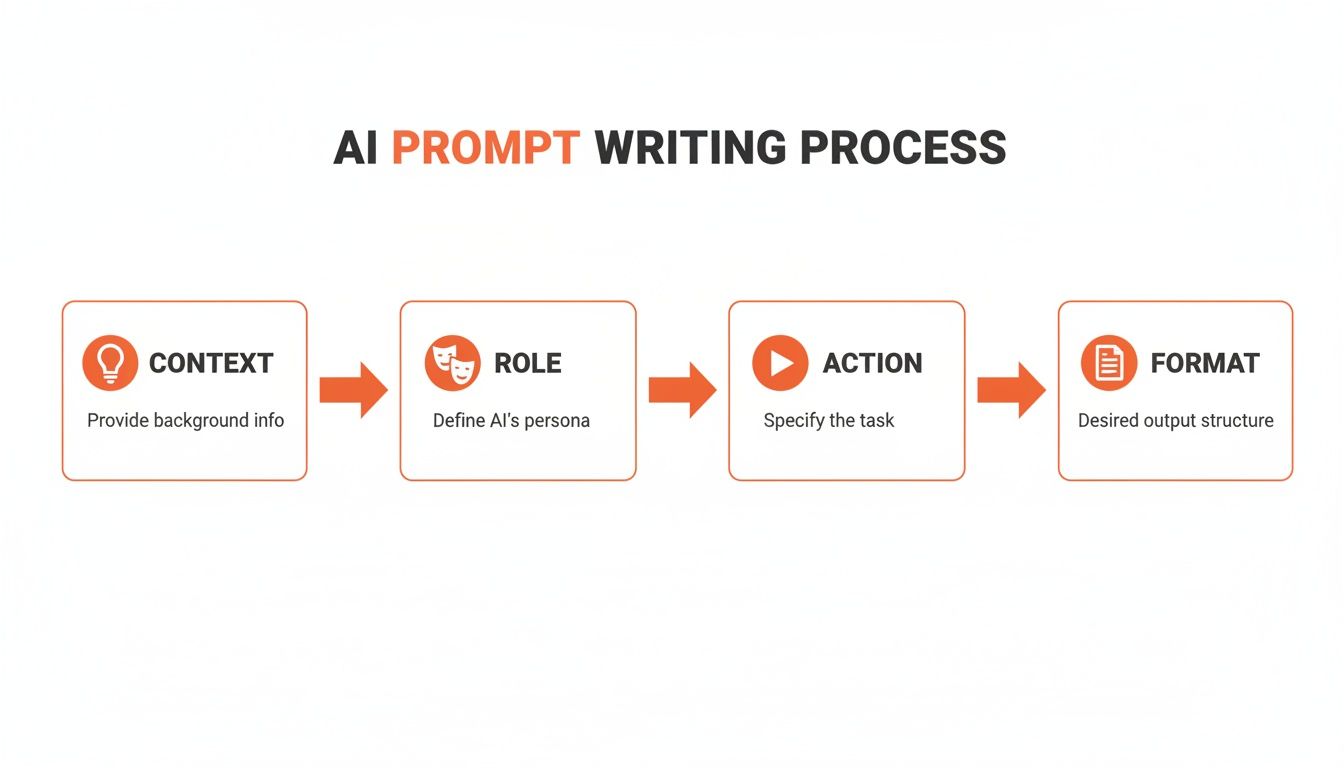
Alt text: A flowchart illustrates the AI prompt writing process with four steps: Context, Role, Action, and Format.
- Context: Give the AI the necessary background. Who is this for? What problem is this solving?
- Role: Assign the AI a persona. This frames the tone, style, and expertise level.
- Action: Clearly state the primary task. Use verbs like “generate,” “summarize,” “rewrite,” or “analyze.”
- Format: Specify exactly how you want the output delivered (e.g., bulleted list, markdown table, 500-word blog post).
Practical Example: From Weak to Strong Prompt
Let’s see how this transforms a request.
Weak Prompt: write about AI.
Strong Prompt (using the CRAF framework):
Context: “I need content for a company blog post aimed at small business owners who are new to technology.”
Role: “Act as a tech journalist specializing in making complex topics easy to understand.”
Action: “Write a 500-word blog post explaining three practical benefits of using AI in marketing.”
Format: “Structure the output with an introduction, three main points with clear headings, and a concluding summary. Use a friendly and encouraging tone.”
The second prompt removes guesswork and sets the AI up for success, saving you from endless revisions. For a deeper look, check out our guide on advanced prompt engineering techniques.
Real-World Starter Prompts for Business
Here are some battle-tested starter prompts you can adapt for common business tasks.
1. For Generating Marketing Copy
- Prompt: “Act as a senior copywriter for a direct-to-consumer brand. Generate five compelling Facebook ad headlines for a new line of sustainable, reusable coffee cups. The target audience is environmentally conscious millennials aged 25-35. Highlight the product’s leak-proof design and stylish aesthetic. Keep each headline under 10 words.”
2. For Brainstorming Content Ideas
- Prompt: “I am a content strategist for a B2B SaaS company that sells project management software. Our target audience is non-technical project managers in the construction industry. Generate a list of 10 blog post ideas that address their biggest pain points, such as budget overruns and communication breakdowns. Format the output as a numbered list with a catchy title for each idea.”
3. For Summarizing Complex Information
- Prompt: “You are an executive assistant. I’m providing a 10-page market research report below. Summarize the key findings into five concise bullet points. Each bullet point should be a single sentence that an executive with no prior context can immediately understand. Focus specifically on market growth projections and competitive threats.”
A little upfront effort in your prompt dramatically improves the final product.
3. Build Your First AI-Powered Workflow
Using a single AI tool is a great start, but the real power comes from connecting them. Chaining multiple specialized tools into a seamless workflow unlocks massive productivity gains. This is how hours of manual work get crunched into an automated process that runs in minutes. Let’s build a content marketing campaign workflow from scratch.
Step-by-Step: A Content Creation Workflow
Goal: Create a blog post, a custom hero image, and a short social media video script based on the article’s main points.
Step 1: Write the Core Blog Post
First, we need the main piece of content. We’ll use a detailed prompt with a powerful text generation tool.
- Tool: A capable AI writing assistant (e.g., GPT-4 or Claude 3).
- Actionable Prompt: “Act as a content marketing expert for a B2B SaaS company. Write a 700-word blog post titled ‘5 Ways to Boost Team Productivity with Project Management Software.’ The target audience is non-technical managers. Use a professional yet approachable tone, include a brief intro and conclusion, and structure the five points with clear H3 headings.”
This gives the AI everything it needs: a role, topic, word count, audience, tone, and format.
Step 2: Design a Custom Hero Image
Next, the blog post needs a compelling visual. We’ll use an AI image generator to create a custom hero image that matches our content.
- Tool: An AI image generator (e.g., Midjourney or DALL-E 3).
- Actionable Prompt: “Create a photorealistic hero image for a business blog post. A diverse team of professionals is collaborating around a digital whiteboard displaying charts and graphs. The style should be modern, clean, and optimistic, with a shallow depth of field. Use a 16:9 aspect ratio.”
By providing specific details, you get a unique visual asset that’s perfectly on-brand.
Step 3: Repurpose for Social Media
Finally, let’s turn the blog post into a short video script for TikTok or Instagram Reels. We’ll feed our original article back into a text AI to distill its key points into a new format.
- Tool: The same AI writing assistant.
- Actionable Prompt: “You are a social media manager. I’ve pasted a blog post below. Summarize the five key takeaways from the article and transform them into a script for a 30-second vertical video. Each point should be a separate scene with a brief visual suggestion in parentheses. The tone should be energetic and direct.”
In three steps, you’ve generated three distinct pieces of marketing collateral by passing the output of one AI tool as the input for the next. This multi-tool approach is where you see exponential time savings. Studies show generative AI can deliver a 66% average productivity boost across tasks like these.
Connecting Tools with No-Code Automation
To automate this workflow, you can use no-code platforms. Think of them as the digital glue that connects your apps.
Platforms like Zapier or Make let you build automated “recipes.” You can set a trigger, like “When a new article is generated in Google Docs,” and define a follow-up action, such as “Send the article’s text to an AI scriptwriting tool.”
This lets you create powerful, custom workflows without touching a single line of code. For a deeper dive, check out our guide to AI workflow automation tools.
4. Refine and Humanize AI Outputs
An AI’s first draft is never the finished product. It’s a brilliant but unpolished starting point. The real magic happens in that last 10%—the human touch that transforms generic text into professional, compelling work. Treat AI as a creative partner, not a content vending machine.

Alt text: Overhead view of hands typing on a laptop, with a notebook and pen nearby, symbolizing human touch.
This “human-in-the-loop” approach is a critical skill. By 2025, an estimated 87% of enterprises will have adopted AI tools, reporting 34% gains in operational efficiency according to AI adoption trends on secondtalent.com. The real value comes from refining that scaled output with human expertise.
How to Use Iterative Prompting
Instead of manually rewriting entire sections, guide the AI to revise its own work. This technique, called iterative prompting, is like having a conversation where you provide direct feedback. It saves time and trains the model to understand your style for future prompts.
Practical Example: Refining a Marketing Email
Let’s say you start with a simple prompt: “Write an email about our new productivity app.” The AI gives you a dry, feature-heavy draft. Don’t rewrite it. Iterate.
- First Iteration (Focus on Benefits): “Rewrite that email. Instead of listing features, focus on how it helps the user save time and reduce stress.”
- Second Iteration (Adjust the Tone): “Better. Now make the tone more witty and less formal. Add a playful sign-off.”
- Third Iteration (Add a Strong CTA): “Perfect. Now, add a clear call to action at the end: ‘Start your free 14-day trial today and reclaim your calendar.'”
With each step, the output gets closer to what you need, and you haven’t written a single sentence from scratch.
Your Essential Human Review Checklist
Run every piece of AI-generated content through this simple checklist.
- Accuracy Check: Did the AI get its facts right? AI models can “hallucinate” and invent information. Always verify statistics, names, and key claims against trusted sources.
- Brand Voice Alignment: Does this sound like us? Tweak vocabulary and sentence structure until the content matches your brand’s personality.
- Originality and Plagiarism: Is this content unique? Run it through a plagiarism checker to ensure it’s not too similar to its training data.
- Flow and Readability: Does it read like a human wrote it? Smooth out clunky paragraphs and repetitive phrases to ensure a natural flow.
Remember, your expertise is the secret sauce. The AI provides the raw ingredients, but your critical eye, industry knowledge, and unique perspective are what make the content truly valuable and trustworthy.
Sharpening your editing skills is key. Our guide on how to improve your writing skills offers techniques that work just as well for AI-assisted content.
Actionable Takeaways
- Treat the AI as a Partner: Use iterative prompting to have the AI revise its own work based on your specific feedback.
- Never Skip the Human Review: Always check AI content for accuracy, brand voice, and originality before publishing.
- Verify, Don’t Trust: Fact-check any statistics, data points, or claims the AI makes.
- Inject Your Personality: Add personal anecdotes, opinions, or unique insights to make the content stand out.
- Focus on Flow: Read the final output aloud to catch awkward phrasing and ensure a smooth, natural reading experience.
5. Use AI Tools Responsibly and Ethically
When you weave AI into your work, you also take on the responsibility to use it carefully. This is about building trust with your audience and protecting sensitive information.
Many free, public AI tools use your prompts to train their models. That means whatever you type in could potentially be seen by developers or become part of the AI’s collective knowledge.
Protect Your Data and Privacy
The most important rule is: assume anything you enter into a public AI tool could become public. Never input sensitive information unless you’re using a paid, enterprise-grade tool with a rock-solid data privacy agreement.
Here’s what you should never share in a public AI tool:
- Confidential Company Data: Internal strategy docs, unreleased financial figures, or proprietary code.
- Personally Identifiable Information (PII): Names, addresses, phone numbers, or any other personal details.
- Client Information: Any data belonging to your clients is completely off-limits.
Ask yourself, “Would I be comfortable if this information was posted on a public forum?” If the answer is no, don’t put it in a standard AI tool.
Understand AI Content Ownership and Bias
Beyond privacy, watch for two other areas: copyright and bias.
The legal side of AI-generated content is still evolving. The output from an AI isn’t automatically yours to copyright. Most platforms grant you a license to use what you create, but you should always check the terms of service.
More importantly, AI models are trained on gigantic datasets from the internet, which is filled with historical and societal biases.
An AI’s output is a reflection of its training data. It is your job to be the critical human filter, ensuring the final product is fair, accurate, and aligned with your values.
For example, asking an AI for images of “a CEO” might overwhelmingly produce one gender or ethnicity. Your job is to spot that, then refine your prompts or edit the outputs to be inclusive and representative. This is a crucial part of incorporating ethical AI in daily decisions.
By treating AI as a powerful assistant that needs careful supervision, you can use these tools with confidence and integrity.
Actionable Takeaways
- Assume No Privacy: Treat every prompt you write for a public AI tool as if it could be seen by anyone.
- Never Share Sensitive Data: Keep confidential company, client, and personal information out of your prompts. No exceptions.
- Review for Bias: Always critically examine AI outputs for stereotypes or unfair representations and make corrections.
- Check the Terms of Service: Understand the usage rights and copyright policies for any AI tool you rely on.
- Choose Enterprise-Grade for Security: When dealing with sensitive work, pay for business-focused AI tools that offer explicit privacy guarantees.
Have Questions About AI Tools? We’ve Got Answers.
As you start weaving AI into your daily workflow, questions are normal. Getting clear answers is key to using these tools with confidence. Let’s tackle some of the most common ones.
What’s the Best AI Tool for a Beginner?
There’s no single “best” tool. The right choice depends entirely on what you’re trying to do right now. A common mistake is looking for one tool to do everything. Specialized tools almost always give you better results for specific tasks.
Start by matching the tool to your immediate goal.
- For Text and Ideas: If you’re drafting emails or summarizing documents, a large language model is your best friend. Tools like RichlyAI or ChatGPT or Google Gemini are incredibly versatile and have generous free plans, making them perfect for getting started.
- For Visuals and Design: To create an image from a text description, platforms like Midjourney or DALL-E 3 (often built into tools like Microsoft Copilot) have intuitive interfaces.
Actionable takeaway: Pinpoint your main need and try a free version of a top tool in that category. Hands-on experience is the fastest way to learn.
Is My Data Safe When I Use an AI Tool?
This is a critical question, and the answer is: it depends. Many free, consumer-grade AI tools may use your prompt data to train their models.
For any sensitive business information, you must use an enterprise-level plan that explicitly guarantees data privacy. These plans contractually agree not to use your data for training.
Before you paste in any proprietary information, always check the terms of service and privacy policy. As a rule of thumb, never input confidential client data, unreleased financials, or personal employee information into a public-facing AI tool.
How Can I Get More Creative and Less Generic Results?
Generic output comes from a generic prompt. To get creative, unique results, give the AI specific, context-rich instructions.
Instead of asking for “a marketing slogan,” try a prompt rich with context: “Act as a world-class copywriter from the 1960s Madison Avenue era. Generate five witty and slightly aspirational marketing slogans for a new brand of eco-friendly coffee that targets young, urban professionals who value both sustainability and style.”
Here are a few techniques that work wonders:
- Give it a Persona: Tell the AI who to be (“Act as a seasoned financial analyst…”).
- Provide an Example: Include a short sample of the tone or style you’re looking for.
- Add Constraints: Set a specific word count, tone, or format.
- Iterate and Refine: Give the AI feedback and ask it to revise its response based on your critique.
Do I Need to Know How to Code to Use AI Tools?
Absolutely not. The vast majority of modern AI tools are built for people who don’t code. They have clean, user-friendly interfaces that feel like any other software.
For connecting different apps, no-code platforms like Zapier or Make are your best friends. They act as a bridge, letting you build powerful automated workflows with simple drag-and-drop menus. The entire ecosystem is designed to be accessible.
Ready to put these insights into action? RichlyAI offers a comprehensive suite of AI tools designed for creators, marketers, and businesses. Generate high-quality text, images, and more with our intuitive platform, and discover thousands of other specialized tools on AI Tools Hub. Start creating smarter, not harder, by exploring what’s possible at RichlyAI
