
Attempting to oversee your social media activities without a plan can lead to disarray, resulting in exhaustion and overlooked opportunities. This is where a social media content calendar becomes essential. Consider it not just as a basic timetable but as your strategic hub, meticulously arranging every future post according to the date, platform, and the exact time it will be published.
This calendar acts as a detailed guide, converting haphazard, last-minute posts into a unified and effective marketing strategy. It ensures that your content is consistently aligned with your goals, allowing for well-timed and impactful communication with your audience.
Why a Content Calendar Is Your Secret Weapon

Let’s be honest, the daily scramble of “what do I post today?” is exhausting. A good content calendar completely eliminates that pressure. It’s what separates brands that just post from those that publish with purpose, driving real, tangible results for their business.
Imagine a fashion brand based in Lagos gearing up for the rainy season. Instead of waking up each day hoping for inspiration, they can use their calendar to plan everything weeks, or even months, ahead.
- Practical Example: They could map out entire content themes—from a video on “5 Waterproof Style Tips for a Lagos Downpour” and an Instagram Reel showing “How to Rock Indoor Photoshoots” to a special promotion on their new line of stylish raincoats. This forward-thinking approach keeps their messaging consistent, relevant, and timely.
Tie Every Single Post to Your Business Goals
A properly built-out calendar does more than just fill your feed; it makes sure every post has a job to do. It’s about ensuring your social media efforts aren’t just chasing vanity metrics like ‘likes’ but are actively helping to grow your brand and bring in revenue.
What does this look like in practice?
-
Keeps Your Brand Voice Consistent: It acts as a guardrail, ensuring your tone and visual style are instantly recognisable across every platform you use.
-
Gives You Your Time Back: Batching your content creation and scheduling it in advance can free up countless hours. This is time you can reinvest in what truly matters—engaging with your community and analysing what works.
-
Drastically Cuts Down on Mistakes: When you aren’t rushing, you have time for a proper review. This simple step helps you catch everything from embarrassing typos and broken links to posts that just feel off-brand.
A mistake I see all the time is treating social media like its own separate island. The best results come when your calendar is woven into your bigger marketing campaigns, making sure every tweet, reel, and story is pulling in the same direction as your overall strategy.
Create a Presence Your Audience Can Count On
In a bustling digital space like Nigeria’s, consistency is king. If you show up irregularly, you’ll be forgotten. A calendar helps you maintain a steady posting rhythm, which builds anticipation and loyalty with your followers. Over time, that reliability is what turns passive followers into a real community.
You can learn more about how building a loyal audience through consistent posting directly impacts your brand’s sales potential. For a deeper dive into the world of content planning, exploring a comprehensive social media content calendar guide can offer even more perspective.
Ultimately, once your foundation is set, the next step is to find out how to drive engagement and brand awareness and truly amplify your reach.
Building Your Strategic Foundation

Before you even think about filling in a single slot on your social media calendar, we need to talk strategy. Honestly, a calendar without a solid plan behind it is just a to-do list of random posts, and that’s not going to move the needle for your business. This foundational work is what makes sure every single thing you post has a purpose and works towards your larger goals.
Step 1: Pinpoint What Works Through an Audit
Start by taking a good, hard look at your existing social media accounts. This isn’t just a quick glance at follower numbers. It’s about getting under the hood to see what’s actually working for your brand and what’s falling flat.
Actionable Steps for Your Audit:
-
Gather Your Data: Log into the analytics section of each social media platform (e.g., Instagram Insights, Facebook Business Suite).
-
Identify Top Performers: Look at the last 3-6 months and list your top 5 posts based on engagement (likes, comments, shares). Note the format (video, carousel, single image) and topic for each.
-
Identify Underperformers: Do the same for your 5 least successful posts.
-
Analyze the “Why”: Ask yourself what the top posts have in common. Was it the candid, behind-the-scenes feel? A clear call-to-action? What made the bottom posts fail? Was the caption uninspired? Was the visual poor quality?
-
Review Competitors: Briefly check 2-3 main competitors. What types of posts get the most interaction for them? This can reveal audience preferences and content gaps you can fill.
- Practical Example: A Nigerian skincare brand I worked with discovered their “before-and-after” video testimonials were getting 50% more engagement than their professionally shot product photos. That’s a goldmine of an insight. It told them exactly where to focus their creative energy: more user-driven video content.
Step 2: Set Goals That Drive Business Growth
Once your audit is done, you can move on to setting goals that are clear and, most importantly, measurable. Vague aims like “increase engagement” just don’t cut it. Your goals need to be specific and directly linked to tangible business results.
Instead of a fuzzy objective, get concrete.
-
Practical Example 1 (B2B): A fintech company in Lagos might decide to increase website traffic from LinkedIn by 20% in the next quarter to bring in more B2B leads.
-
Practical Example 2 (B2C): A fashion retailer in Abuja could aim to boost online sales from Instagram Reels by 15% in the next month.
See the difference? These are goals you can actually track and report on.
Step 3: Understand Your Audience Deeply
You can’t create content that connects if you don’t know who you’re talking to. This is where detailed audience personas become invaluable, and I mean going way beyond basic demographics. Knowing your target audience is in Nigeria is a start, but it’s not enough.
Data from June 2025, for example, showed Nigeria had around 51.2 million Facebook users, with the biggest age bracket being 25-34. You can dig into detailed social media user statistics in Nigeria to get this kind of information, which is vital for fine-tuning your content.
But you need to go deeper. Map out their interests, their online habits, their pain points.
- Actionable Tip: Create a simple persona document. Give your ideal customer a name (e.g., “Sade, the Lagos Tech Professional”). List her goals, her challenges (e.g., “too busy to cook healthy meals”), her favourite social media platforms, and the kind of content she loves (e.g., “quick recipe videos, motivational quotes”). This makes it easier to create content for Sade, not just for a faceless demographic.
A robust strategy, built on this foundation of auditing, goal-setting, and audience insight, is what turns your calendar from a simple schedule into a powerful growth engine. For those looking at how to manage this whole process efficiently, you might find some useful ideas in this piece on scaling content creation effortlessly with Richly AI.
Choosing Your Calendar Tools and Template
Picking the right tool for your social media content calendar is one of those foundational decisions that can make or break your workflow. It’s the difference between organised harmony and last-minute chaos. There’s no single “best” tool—the right choice for you will depend entirely on your team’s size, your budget, and what you actually need it to do. What works for a solo business owner is going to fall short for a growing agency.
If you’re just starting out or working with a small team, don’t overcomplicate it. A simple spreadsheet like Google Sheets can be a fantastic, no-cost starting point. It’s accessible from anywhere, easy to share, and you can customise it to your heart’s content.
As your team or client list grows, you’ll likely feel the need for something more robust. This is where dedicated social media management platforms like Buffer or Hootsuite come in. They offer features that spreadsheets can’t, like direct scheduling, team collaboration tools, and built-in analytics.
Social Media Calendar Tool Comparison
| Tool | Best For | Key Features | Starting Price |
|---|---|---|---|
| Google Sheets | Individuals & Small Startups | Fully customisable, free, real-time collaboration. | Free |
| Trello | Visual Planners & Small Teams | Kanban-style boards, checklists, due dates, easy drag-and-drop. | Free (with paid tiers) |
| Buffer | Small to Medium Businesses | Direct scheduling, analytics, intuitive interface, content queue. | Free (with paid tiers) |
| Hootsuite | Agencies & Large Enterprises | Manages multiple accounts, advanced analytics, team assignments, social listening. | $99/month |
| Sprout Social | Data-Driven Teams | In-depth reporting, publishing tools, social listening, CRM features. | $249/month |
Ultimately, the best tool is the one your team will consistently use. Don’t be afraid to start with a free option and upgrade only when you feel the growing pains.
A Step-by-Step Guide to Building Your Calendar Template
No matter which tool you land on, the structure of your calendar is what truly counts. A well-thought-out template is your roadmap. If you’re looking for a solid foundation, this essential editorial calendar template guide is a great resource.
Here’s a step-by-step guide to creating your own template in a tool like Google Sheets:
-
Create Your Spreadsheet: Open a new sheet and name it “Social Media Content Calendar [Month/Year]”. Create tabs at the bottom for each month.
-
Set Up Core Columns: Create the following column headers in the first row:
-
Date: The exact date the post will go live.
-
Time: The specific time for publishing.
-
Platform: Which social network (e.g., Instagram, LinkedIn, X).
-
Post Copy: The final, approved text for the post.
-
Visuals: A direct link to the approved image/video (e.g., from Google Drive or Dropbox).
-
Status: A dropdown menu (use Data Validation in Sheets) with options like ‘Draft’, ‘In Review’, ‘Approved’, ‘Scheduled’.
-
Notes/Link: For any specific instructions or the published post’s URL.
-
-
Add Strategic Columns (The Pro-Tip): Now add these crucial columns:
-
Content Pillar: The theme this post belongs to (e.g., ‘Educational’, ‘Promotional’, ‘Community’). This helps you see your content mix at a glance.
-
Goal/KPI: What business goal does this post support? (e.g., ‘Drive Clicks to Blog’, ‘Increase Reel Views’).
-
Color-Code for Clarity: Use conditional formatting to automatically color-code rows based on status (e.g., ‘Approved’ is green, ‘In Review’ is yellow) or platform. This makes the calendar scannable.
Your template is now a strategic tool, not just a schedule.
Visualising Your Workflow
A clear workflow is the engine that keeps your content calendar running smoothly. It’s not just about filling in dates; it’s a strategic process.
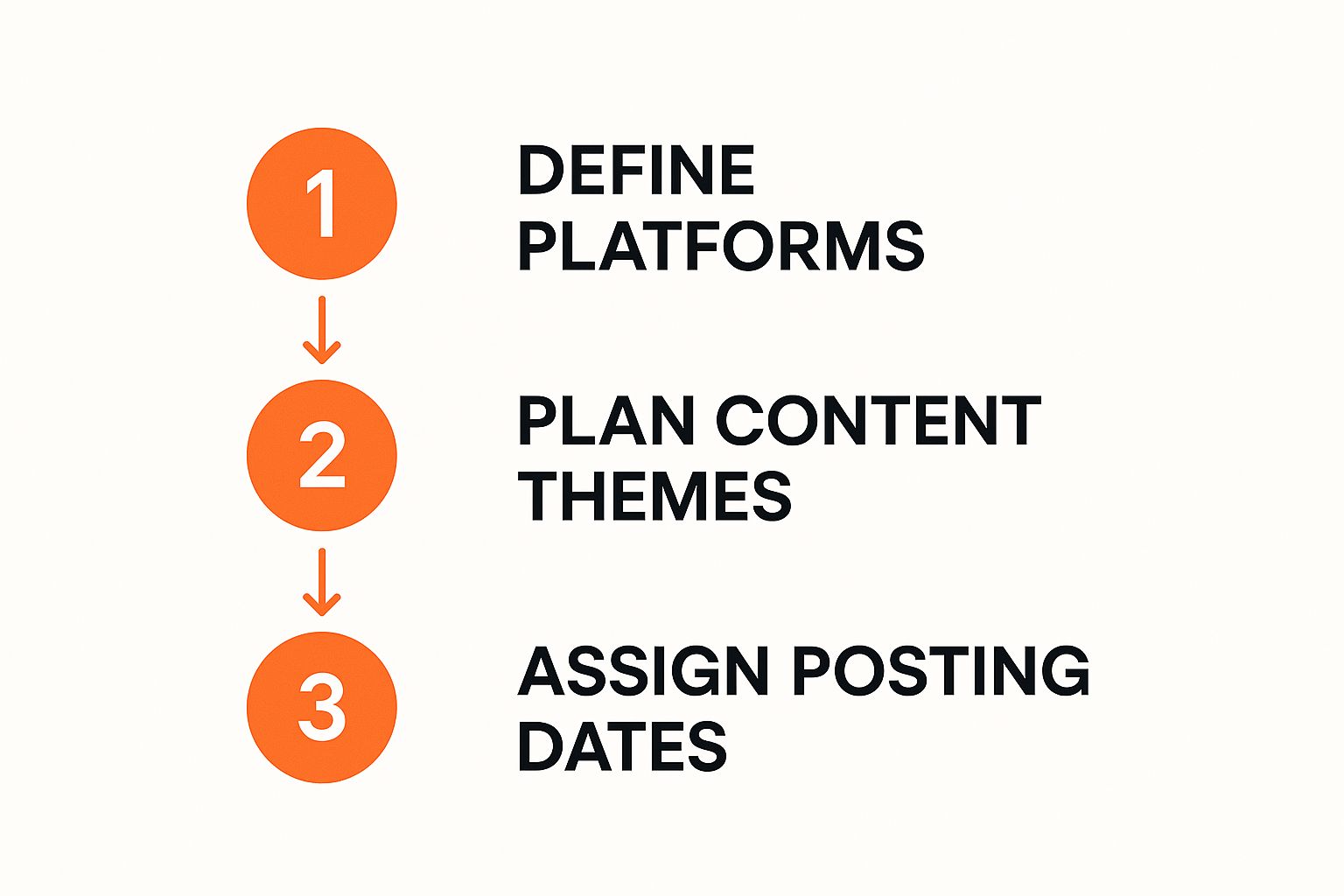
As you can see, a successful social media strategy starts way before you even open your calendar. It begins with understanding your platforms and planning your themes. This approach ensures every post has a purpose and aligns with your bigger goals.
The key takeaway here is to build a template that adapts to your process, not the other way around. Your calendar should be a flexible tool that makes your life easier, not a rigid system that you have to fight against.
Filling Your Calendar With High-Impact Content
Alright, you’ve got your template. Now for the fun part. This is where we stop organising and start creating. We’re moving beyond the “when” and “where” to figure out the “what”—the actual posts that will grab your audience’s attention and help you hit your business goals. The aim here is to build a content flow that’s predictable enough for you to manage but exciting enough for your followers.
Step 1: Establish Your Content Pillars
Staring at a blank calendar can feel a bit daunting. The best way to kick things off is by setting up your core content pillars. These are the 3-5 main themes your brand will consistently talk about. They ensure every post reinforces your expertise.
- Practical Example: For a Nigerian fitness brand, your pillars might be “Workout Tutorials,” “Healthy Local Recipes,” “Client Success Stories,” and “Mindset Motivation.” When you brainstorm, you aren’t pulling random ideas out of thin air; you’re specifically thinking, “What’s a great ‘Healthy Local Recipe’ I can share this week?”
Step 2: Create a Balanced Content Mix
With your pillars locked in, the next challenge is to vary your formats. If you only post static images, your feed will get stale—fast. A healthy mix of formats is what keeps people engaged.
-
Practical Example: Let’s map out a week’s content mix for a Nigerian fashion brand:
-
Monday (Educational Pillar): Post an Instagram carousel on “3 Ways to Style Adire for the Office.” This immediately positions you as a style expert.
-
Wednesday (Behind-the-Scenes Pillar): Share an Instagram Story or Reel showing the craftsmanship of a new collection. This builds a genuine connection to your process.
-
Friday (Community Pillar): Feature fans! A post showcasing user-generated content (UGC) is a fantastic way to celebrate a customer who tagged your brand in their outfit.
-
Saturday (Promotional Pillar): Announce a weekend flash sale on specific items. Since you’ve provided value all week, this sales post feels earned, not spammy.
-
Actionable Insight: Stick to the 80/20 rule. 80% of your content should provide genuine value (teach, entertain, or inspire), and only 20% should be directly promotional. This is how you build trust and stop people from scrolling right past your posts.
Step 3: Tap into Timely and Relevant Moments
A great content calendar isn’t set in stone; it’s a living document. While your pillars provide the structure, you must leave room for spontaneous, real-time content.
- Actionable Step: At the start of each month, look up relevant awareness days, national holidays, and local events. For Nigerian brands, this could mean planning content around Democracy Day (June 12) or Independence Day (October 1). Posts tied to these kinds of observances can see up to 37% more engagement than standard content. If you want to dive deeper, you can explore how brands benefit from this strategy in this detailed analysis.
This means staying on top of trending topics, knowing what’s happening in key cities like Lagos or Abuja, and understanding the cultural moments that matter to your audience. It shows you’re not just a faceless corporation, but a member of the community.
Let’s be real, constantly coming up with fresh ideas is tough. For those days when the well runs dry, AI can be an incredible brainstorming partner. We put together a list of 10 diverse ChatGPT prompts tailored for digital marketers that can help spark some creativity.
By blending your solid, evergreen pillars with this timely, relevant content, you’ll create a social media presence that feels both reliable and exciting.
Executing and Refining Your Content Strategy
Having a finished social media content calendar feels like a huge win, but honestly, it’s just the starting line. Think of your calendar not as a rigid set of rules, but as a living, breathing document that’s meant to change and adapt. The real magic happens when you get into a rhythm of executing, analysing, and then strategically tweaking your plan.
The first step is nailing consistency. Scheduling posts ahead of time using your calendar is non-negotiable.
- Actionable Workflow: Dedicate a block of time each week (e.g., Monday morning) to schedule all approved content for the week ahead. This frees you from the daily scramble and allows you to focus on what really matters: engaging with your community in comments and DMs. That’s where you turn followers into genuine, loyal customers.
Tracking What Truly Matters
If you want to get better, you have to track the right things. I’m talking about the Key Performance Indicators (KPIs) that actually connect to your business goals, not just vanity metrics. Sure, a post with a ton of likes feels great, but likes don’t pay the bills.
Focus your analysis on the metrics that tell the real story:
-
Engagement Rate: The percentage of your audience that interacts with your post. A high rate means your content is resonating.
-
Click-Through Rate (CTR): How many people clicked the link in your post? Crucial for driving traffic.
-
Conversion Rate: How many clicks turned into a desired action (e.g., a sale or sign-up)? This directly measures business impact.
Actionable Insight: The most common mistake is obsessing over reach. Having 100,000 views with zero clicks is far less valuable than 1,000 views that bring in 50 new leads or sales. Your metrics have to tell a story about business impact.
To make all of this a bit easier on yourself, it’s worth looking into tools for marketing workflow automation. They can really help streamline the whole process of scheduling content and tracking how it performs.
The Monthly Review Framework: A Step-by-Step Guide
Block out time at the end of every month for a review. This isn’t about creating a massive report; it’s about a quick, honest check-in to find actionable insights.
Here’s a simple step-by-step framework:
-
Spotlight Your Winners: Dive into your analytics and find your top 3-5 posts for the month based on your main KPI (e.g., engagement, shares, or clicks). Ask: What pattern do you see? Was it a Reel? Was it an educational topic?
-
Learn from the Duds: Now, do the same for your bottom 3-5 posts. Try to figure out why they didn’t land. Was the copy confusing? Was the visual off-brand? Your underperforming posts are often your best teachers.
-
Listen to Your Audience: Read your comments and DMs. What questions keep popping up? What are people saying? This qualitative feedback is pure gold for content ideas and improving the customer journey. You can learn more about boosting customer satisfaction with memorable experiences.
-
Adapt and Evolve: Based on your findings, decide what to do differently. Action: Make these changes directly in your content calendar for the next month. For example: “Action Item: Create two more Reels based on the successful ‘Styling Tips’ format” or “Testimonial Tuesdays worked well; let’s continue that.”
This cycle—execute, measure, refine—is what separates a social media presence that thrives from one that just stagnates.
Frequently Asked Questions
Even the most organised social media manager runs into questions. Here are my answers to a few common curveballs, designed to help you keep things running smoothly.
How Often Should I Actually Be Posting?
This is the million-dollar question, isn’t it? But there’s no single magic number. The right frequency comes down to your audience and the platform.
-
Practical Guideline: For visually-driven platforms like Instagram, aiming for 3-5 high-quality posts per week is a great starting point. For a faster platform like X (formerly Twitter), you might need to post 1-3 times a day to stay visible.
-
Actionable Insight: Consistency always trumps frequency. It’s far better to share three fantastic posts every week than to burn out churning out seven mediocre ones. Use your platform’s analytics to see when your followers are most active and let that data guide your schedule.
I’m Falling Behind on My Calendar—What Now?
First, don’t panic. It happens. Here’s a step-by-step recovery plan:
-
Triage: Pause and identify time-sensitive posts (e.g., a flash sale announcement). Get those out the door first.
-
Reschedule: It’s completely fine to reschedule or even skip a less critical, evergreen post to catch your breath.
-
Deploy Evergreen Content: Use your “emergency fund” of timeless posts—quick tips, behind-the-scenes glimpses, or FAQs—to fill any unexpected gaps. This is a lifesaver.
-
Reflect and Adjust: Once you’re back on track, figure out why you fell behind. Was the schedule too aggressive? Did a video take longer to edit than planned? Use that experience to build a more realistic calendar for the next month.
How Do I Make My Content Work Across Different Platforms?
Resist the urge to just copy and paste the same message everywhere. It’s a shortcut that rarely pays off. Instead, a little customisation goes a long way.
-
Practical Example: You’re launching a new product. Here’s how you adapt the announcement in your calendar:
-
LinkedIn: Copy: “Excited to launch our new productivity tool designed to help marketing teams save 10 hours a week. Here’s how it works…” Visual: A short demo video or a link to a detailed case study.
-
Instagram: Copy: “It’s here! 🔥 Meet the new tool that will change your workflow forever. Link in bio to grab yours!” Visual: A high-energy, attention-grabbing Reel showing the product in action.
-
Facebook: Copy: “Tired of tedious marketing tasks? We’ve got something for you! Tag a teammate who needs this. 👇” Visual: A carousel of images showing key features and benefits, encouraging comments and shares.
-
The core message is consistent, but you’re delivering it in a way that feels native to each platform. As you bring more sophisticated tools into your workflow, it’s also wise to consider the ethical use of AI in the workplace to make sure your content process is both effective and responsible.
Ready to stop scrambling and start strategising? RichlyAI gives you the tools to plan, create, and schedule your social media content effortlessly. Build your content calendar and automate your posting schedule to save time and grow your brand. Sign up for free at RichlyAI and take control of your social media today.
