
At its core, an AI chatbot app is a clever piece of software designed to chat with people just like a human would. It uses artificial intelligence to understand what you’re asking and provide a genuinely helpful response, automating tasks and engaging users across websites and apps. It’s become a go-to tool for customer support, sales, and marketing for a very good reason.
So, What Is An AI Chatbot App, Really?
Imagine having a sales assistant who works around the clock, never gets tired, and learns something new from every single customer interaction. That’s the essence of a modern AI chatbot app. It’s a world away from the rigid, scripted bots of the past, offering a much more dynamic and personal experience.
The old-school, rule-based chatbots were a bit like a digital FAQ page. They could only answer questions they were specifically programmed to recognise, following a strict, predefined script. The moment a user phrased something a little differently, the bot would hit a wall.
To really grasp the difference, let’s compare them side-by-side.
Rule-Based Chatbots vs AI Chatbot Apps
| Feature | Rule-Based Chatbot | AI Chatbot App |
|---|---|---|
| Conversation Flow | Follows a strict, pre-programmed script. | Engages in fluid, natural conversations. |
| Understanding | Relies on exact keyword matching. | Understands user intent, context, and slang. |
| Learning Ability | Static; requires manual updates. | Learns and improves from every interaction. |
| Complexity | Simple to build for basic tasks. | More complex, requiring AI and ML expertise. |
| User Experience | Can be frustrating and limited. | Offers a helpful and human-like experience. |
As you can see, the leap from a rule-based system to an AI-powered one is significant. It’s the difference between a simple Q&A tool and a true conversational partner.
The AI Difference: Understanding and Learning
So, what’s the magic behind the curtain? An AI-powered chatbot uses a couple of key technologies that allow it to think and adapt, making the conversation feel much more natural.
- Natural Language Processing (NLP): This is the bot’s brain for language. NLP allows it to interpret a user’s intent, context, and even colloquialisms—much like a person would. Instead of just spotting keywords, it figures out what someone actually means.
- Machine Learning (ML): This gives the bot the power to learn on the job. With every conversation, the chatbot gathers data, spots patterns, and fine-tunes its answers. Over time, it becomes smarter, more accurate, and far more helpful.
This is how an AI chatbot processes information to deliver a relevant response.
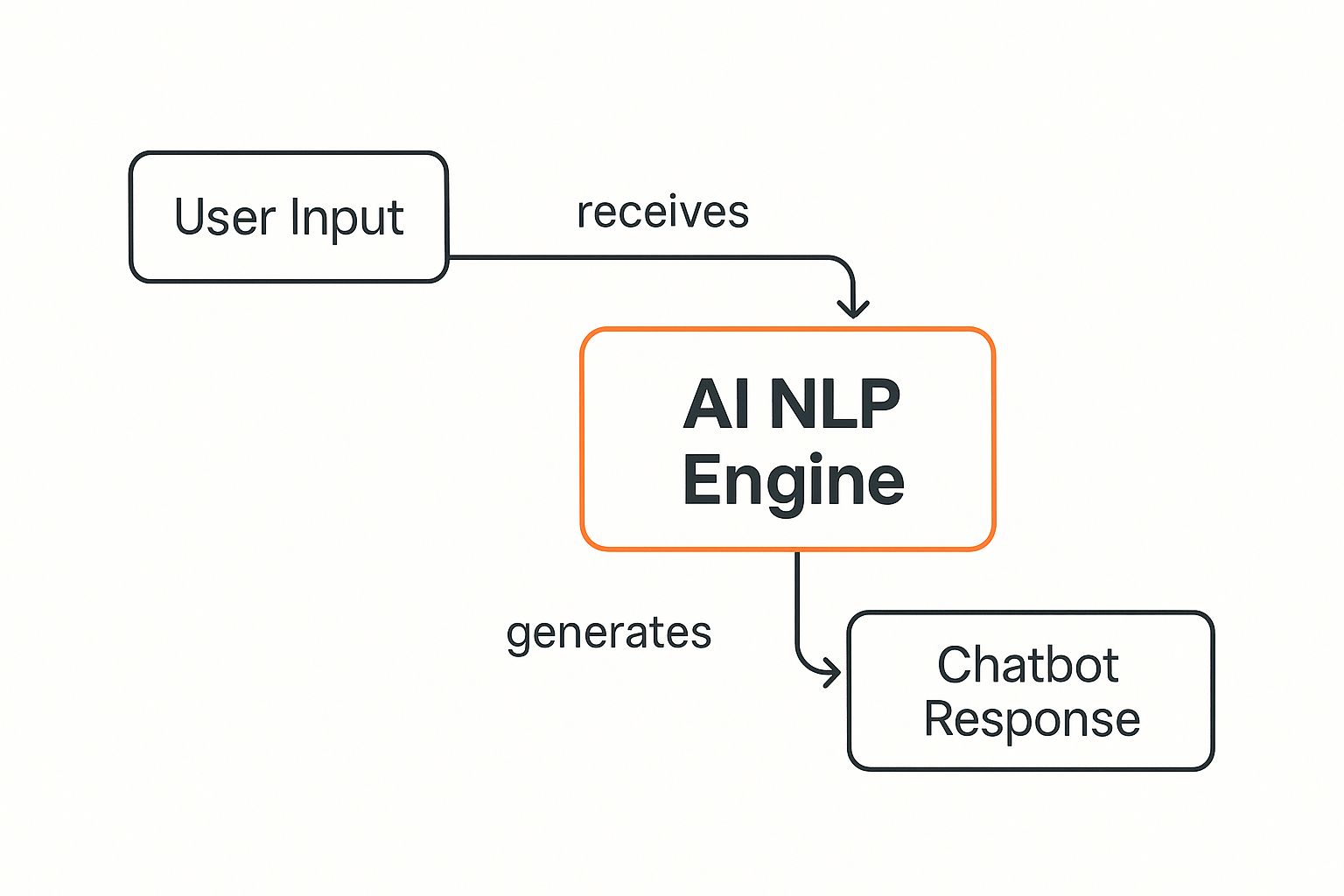
The diagram makes it clear: the AI engine is the crucial link between what a user types and the helpful answer the chatbot gives back.
An AI chatbot app is more than just an automated answering machine; it’s a conversational partner that understands context, anticipates needs, and gets smarter with every conversation it has.
Actionable Insight: The real power here is adaptability. For example, a rule-based bot might fail if a user types, “I wanna change my flight,” but an AI chatbot understands the slang (“wanna” = “want to”), grasps the intent (flight modification), and can then ask for the booking reference to guide the user through the process step-by-step.
If you want to get a feel for this yourself, playing around with a free AI chat tool can show you what these capabilities look like in practice. The difference in user experience is night and day, which is why it leads to happier customers and better results for businesses.
The Technology That Powers Smart Conversations

To really get what makes an AI chatbot app feel so intelligent, you have to pop the bonnet and see what’s inside. Don’t worry, this isn’t a deep dive into code, but a straightforward look at the engine making these smart conversations happen. It all comes down to a few powerful technologies working together.
First up is Natural Language Processing (NLP). The best way to think of NLP is as a super-skilled translator. It doesn’t just process words; it gets the meaning behind them—the context, the intent, and even the local slang. This is how a customer can type “I wan buy shoe” instead of the more formal “I would like to purchase footwear,” and the bot knows exactly what they need.
This knack for understanding the messy, real-world way we communicate is what separates a truly great AI chatbot from those frustrating, robotic ones. It’s the magic ingredient that makes the conversation feel natural, which can boost customer satisfaction by up to 20% for businesses that nail it.
The Brain That Learns And Improves
Next, we have Machine Learning (ML). This is basically the chatbot’s ability to learn on the job. Think about a new customer service agent on their first day; they might struggle with tricky questions. But give them a few months of real-world interactions, and they become a pro who can handle almost anything thrown their way.
ML does the same thing for an AI chatbot app. It sifts through thousands of conversations, figuring out which answers work, which ones don’t, and how customers actually ask for things.
A chatbot with machine learning doesn’t just answer questions; it evolves. Each interaction is a lesson, making the bot smarter, faster, and more aligned with your customers’ actual needs over time.
Practical Example: If dozens of users start asking “How do I track my delivery?” in slightly different ways (“where my order,” “delivery status,” “track package”), the ML model quickly learns to recognise this single intent. This means you don’t have to manually update scripts for every possible phrasing, saving your team valuable time.
Creating Fresh And Relevant Dialogue
The final, and perhaps most exciting, piece of the puzzle is Generative AI. If NLP helps the bot understand and ML helps it learn, Generative AI gives it a voice. This is what allows the chatbot to create completely new, human-like responses on the spot.
This is a massive leap from older bots that could only parrot pre-written answers. A generative AI chatbot can do things like:
- Summarise a long chat for a human agent stepping in.
- Draft a personal follow-up email based on what the user asked.
- Create unique product descriptions when a customer asks for a recommendation.
Practical Example: A customer might say, “I need a durable phone with a great camera under ₦150,000.” Instead of just firing back a generic product link, a generative bot can write a fresh response: “Great choice! For that budget, I’d recommend the Samsung A54 or the Tecno Camon 20 Pro. The Samsung has a slightly better screen for watching videos, but the Camon 20 Pro’s night-time camera is fantastic. Which one sounds more like you?” This creative power is the same principle you see when using AI to design a brand logo or other creative assets—the system creates something brand new from your instructions.
Together, these three technologies—NLP, ML, and Generative AI—are the trio that powers the smooth, smart, and genuinely helpful conversations you get from a top-tier AI chatbot app.
How an AI Chatbot App Can Transform Your Business
It’s one thing to understand the technology behind an AI chatbot app, but seeing what it can actually do for your business is where the real value hits home. When you move from theory to practice, you quickly realise these tools aren’t just fancy gadgets; they are powerful engines for growth, efficiency, and building stronger customer relationships.
Picture this: a late-night shopper is on your e-commerce site in Lagos, trying to find the right size for a pair of shoes. Instead of getting frustrated and leaving, a chatbot pops up. It instantly understands their question, checks your inventory, and points them to the perfect product. Just like that, you’ve closed a sale that would have otherwise been lost. This is the tangible impact of an AI chatbot.
Driving Real-World Business Outcomes
For most businesses, the first and most obvious benefit is a massive improvement in customer support. An AI chatbot works around the clock, 24/7, answering common questions in a heartbeat. This frees up your human team to focus their expertise on the more complex issues that truly need a personal touch.
Practical Example: A bank in Abuja can use its chatbot to handle hundreds of simultaneous requests for routine tasks like checking account balances, pulling up transaction histories, or finding the nearest branch. This allows its human agents to dedicate their valuable time to high-stakes tasks like investigating fraud claims or offering detailed financial advice—interactions that build genuine customer trust and loyalty.
This kind of smart automation delivers direct, measurable results. In Nigeria, we’re already seeing its effect in key sectors. For instance, telecom operators have integrated AI chatbots to manage over 60% of their digital customer interactions, slashing wait times and boosting issue resolution rates by more than 30%. Similarly, roughly 35-40% of top Nigerian online retailers now use bots as virtual shopping assistants for round-the-clock engagement.
Becoming an Engine for Growth
Beyond just support, a well-designed AI chatbot app is a fantastic tool for generating leads and driving sales. It can engage with visitors on your website, ask smart qualifying questions, and send high-potential leads straight to your sales team.
Think of an AI chatbot app as your frontline qualifier, sorting casual browsers from serious buyers. It warms up leads so that when your sales team steps in, they’re talking to someone who is already informed and interested.
Here’s a practical, step-by-step example of how this plays out:
- Initial Engagement: A visitor lands on your services page. The chatbot appears with a helpful, non-intrusive message: “Hi! Looking for a solution to manage your social media? I can help you find the right plan.”
- Qualification: The bot then asks a couple of simple questions, such as, “What’s your biggest challenge with social media?” or “How many accounts do you manage?” This quickly helps gauge the visitor’s needs.
- Lead Routing: Based on their answers, the bot can instantly schedule a demo with a sales representative or share a link to a relevant case study, ensuring the lead gets the right information without delay.
This automated process doesn’t just speed up your sales cycle; it ensures no potential customer ever slips through the cracks. It’s a proactive approach that turns passive website traffic into active sales opportunities.
Achieving Significant Cost Savings
Finally, the return on investment from an AI chatbot app often shows up in significant operational cost savings. By automating all those repetitive tasks, you reduce the need for a large customer service team just to handle routine queries. This allows you to scale your support operations without scaling your headcount at the same rate.
Actionable Insight: The efficiency gains go beyond just answering questions. To see how AI can streamline operations beyond conversations, you might want to explore some of the leading AI workflow automation tools. These systems can connect your chatbot to other business processes, such as automatically creating a support ticket in your helpdesk software or adding a new lead to your CRM, creating a truly automated and highly efficient operation from end to end.
Must-Have Features in Your AI Chatbot App
With so many AI chatbot apps on the market, picking the right one can feel like a huge task. But when you get down to it, there are a few core features that really separate a genuinely helpful tool from one that just adds to the noise. Think of this as your essential checklist to make sure you’re getting a solution that will actually deliver results.
Let’s be honest, not all chatbots are built the same. The best ones slide right into your existing operations and connect with your customers wherever they are, without creating headaches. So, what should you really be looking for?
True Omnichannel Support
Your customers aren’t just sitting on your website. They’re on WhatsApp, scrolling through Instagram, and active on Facebook. A top-tier AI chatbot needs to offer omnichannel support, which means you can deploy the very same intelligent assistant across all the channels where your audience lives.
This creates a smooth, continuous experience. A customer could start a chat on your website, pick it back up later on WhatsApp, and never miss a beat. It’s all about showing up and being helpful on the platforms they already love and use every single day.
Practical Example: A customer in Nigeria spots your ad on Instagram and slides into your DMs with a question. Your AI chatbot replies instantly, handles their first few questions, and then suggests moving to WhatsApp for a more in-depth chat. That kind of seamless flow prevents you from losing a potential customer and meets them where they’re most comfortable.
Seamless Human Agent Handover
Even the most advanced AI can’t handle everything. Some conversations are just too complex, sensitive, or high-stakes and need a real person to step in. That’s why a seamless human agent handover is absolutely critical.
When the bot reaches its limit, it needs to be able to smoothly transfer the conversation—along with the full chat history—to one of your human agents. This simple feature prevents the one thing that drives customers confused: having to explain their problem all over again. A clean handover keeps customers happy and lets your support team get straight to the point.
Robust Analytics and Reporting
How can you be sure your chatbot is actually helping? If you aren’t looking at the data, you’re just guessing. Solid analytics and reporting are non-negotiable for tracking performance and figuring out what needs to be improved.
A good AI chatbot app will give you clear dashboards tracking the most important metrics, like:
- Most Frequent Questions: This tells you what’s on your customers’ minds.
- Resolution Rate: Shows you how many queries the bot solves on its own.
- Conversation Duration: Gives you an idea of how efficient the bot is.
- User Satisfaction Scores: Lets you get direct feedback on how well the chatbot is doing.
Actionable Insight: Use the “Most Frequent Questions” report to identify gaps in your website’s content. If many users are asking about your return policy, it’s a clear signal to make that information more prominent on your site. This turns your chatbot into a valuable source of business intelligence.
Multilingual Capabilities
For any business operating in a diverse market like Nigeria, being able to speak your customer’s language isn’t just a nice-to-have—it’s essential. Your audience might speak English, Nigerian Pidgin, Yoruba, Igbo, or Hausa. A truly effective AI chatbot has to understand and reply in multiple languages.
This isn’t just about making a sale; it’s about making your brand feel accessible and inclusive. It shows you value your customers’ preferences, which is a powerful way to build trust. There are big ethical considerations here, too, which you can read more about in our guide on the ethical use of AI in the workplace.
Easy Customisation and Training
Finally, your chatbot needs to sound like you. The best platforms make easy customisation and training a priority. You should be able to simply feed the AI your company’s documents, website pages, and FAQs to train it on your specific products, services, and policies.
This makes sure its answers are always on-brand, accurate, and truly helpful to your customers.
To help you put all this together, here’s a quick checklist you can use when you’re looking at different chatbot providers.
Key Feature Checklist for an AI Chatbot App
This table summarises the critical functionality you should look for, ensuring you don’t overlook anything important when evaluating your options.
| Feature | Why It’s Critical | Look For This |
|---|---|---|
| Omnichannel Support | Your customers are on multiple platforms. Be there for them with a consistent experience everywhere. | Direct integrations with WhatsApp, Facebook Messenger, Instagram, and your website. |
| Human Agent Handover | AI can’t solve every problem. A smooth transfer to a human agent prevents customer frustration. | The ability to transfer the chat and the full conversation history to a live agent without making the customer repeat themselves. |
| Analytics & Reporting | You can’t improve what you don’t measure. Data is key to understanding chatbot performance and customer needs. | A dashboard with metrics like resolution rate, common questions, chat duration, and customer satisfaction (CSAT) scores. |
| Multilingual Support | In diverse markets like Nigeria, speaking the local languages (including Pidgin) builds trust and accessibility. | The ability to automatically detect and respond in multiple languages, including regional ones relevant to your customer base. |
| Easy Customisation | The chatbot must reflect your brand’s voice and provide accurate, company-specific information. | An easy-to-use interface where you can upload your own documents, website links, and FAQs to train the AI. No coding should be required. |
Using this checklist as your guide will help you filter out the basic bots and focus on the tools that can genuinely support your business goals and delight your customers.
Your Step-by-Step Implementation Plan

Ready to move from theory to action? Getting your first AI chatbot app up and running might seem like a huge project, but it’s far more manageable when you break it down into clear, practical steps. This roadmap will guide you through each stage, helping you sidestep common pitfalls and launch a tool that delivers real value from day one.
The secret is to start small and build momentum. Don’t try to create a bot that does everything at once. Instead, focus on solving one or two key problems really, really well.
Step 1: Define Your Goals
Before you even think about a platform or a single line of conversation, you have to know what you want to achieve. Vague goals like “improve customer service” just won’t cut it. You need specific, measurable objectives that clearly define what success looks like for your business.
So, think about your biggest pain points. Are customers stuck waiting too long for answers? Is your team drowning in the same repetitive questions? Are you losing potential sales after hours?
Here are a few practical examples of strong goals:
- Reduce customer service response times by 50% within the next three months.
- Automate the handling of at least 60% of all “where is my order?” queries.
- Increase qualified leads generated through the website by 25% in the next quarter.
By setting clear targets upfront, you give the entire project a sense of direction. This allows you to measure your return on investment and prove the chatbot’s value to your organisation. It’s what turns your chatbot from a neat tech gadget into a strategic business asset.
Step 2: Choose the Right Platform
With your goals set, it’s time to select the right tool for the job. The platform you choose will hinge on the features you already identified as critical—things like omnichannel support, seamless human handover, and easy customisation.
Look for a platform that aligns with your team’s technical skills and your budget. Many modern solutions, like RichlyAI Hub, are designed for non-technical users, allowing you to build and train a powerful chatbot without writing any code. Also, consider how well a platform’s language capabilities match your audience’s needs. For more on this, you can check out our article on simplifying life with Natural Language Processing.
Step 3: Design the Conversation Flow
This is where you map out exactly how your chatbot will interact with users. A good conversation flow is like a well-planned journey; it guides the user smoothly from their initial question all the way to a successful resolution.
Start by identifying the most common customer questions or tasks. For an e-commerce store, this might be tracking an order, asking about return policies, or checking on product availability.
Once you have your main use cases, map them out visually. Think of it like a simple flowchart. What’s the first thing the bot should say? What clarifying questions should it ask? And what happens if the user asks something completely unexpected? Planning this out prevents confusing conversations that lead to a dead end.
Actionable Insight: Make sure the bot’s personality is consistent with your brand. If your brand is friendly and informal, your chatbot’s language should reflect that. For instance, instead of “Greetings. How may I assist you?”, try “Hey there! What can I help you find today?”. This small detail makes the entire interaction feel much more authentic.
Step 4: Train and Test Your Chatbot
An AI chatbot is only as smart as the data you train it on. This is, without a doubt, the most crucial step for ensuring your bot gives accurate and helpful answers. The best platforms make this part easy by letting you upload your existing business documents directly.
To train your chatbot, you’ll want to feed it information from:
- Your Website: Key pages like your FAQ, About Us section, and detailed product descriptions.
- Knowledge Base: Any help articles, tutorials, or internal support guides you already have.
- Company Policies: Official documents covering returns, shipping, and privacy.
After you’ve trained the AI, the next phase is rigorous testing. Before you unleash it on the public, have a small, internal group of employees interact with it. Ask them to try and “break” it by asking difficult or unusual questions. This internal beta testing will uncover weaknesses and give you a chance to fix them before your customers ever see them. This feedback loop is absolutely essential for building a reliable and effective AI chatbot app.
Common Questions About AI Chatbot Apps
Even after seeing all the benefits and features, it’s completely normal to have a few practical questions before jumping into an AI chatbot app. As a business owner, you’re likely thinking about the real-world stuff—the cost, the security of your customer data, and how much time this will actually take. Let’s tackle those common concerns head-on.
Think of this as the final piece of the puzzle. My goal here is to give you the straightforward answers you need to feel confident about your decision.
How Much Does an AI Chatbot App Cost?
This is usually the first question on everyone’s mind, and the honest answer is: it really depends. The price tag is tied directly to how complex you need your chatbot to be. A simple, no-code chatbot that just answers common questions can be surprisingly affordable, with many platforms offering monthly plans that won’t break the bank for a small business.
On the other end of the spectrum, if you need a fully custom AI chatbot that plugs into all your existing business systems, that’s going to require a more significant investment upfront. The best way to manage costs is to sit down and separate your “must-have” features from the “nice-to-haves.”
Practical Example: A small online clothing store might get everything it needs from a ₦15,000 per month plan to handle basic order tracking and FAQs on WhatsApp. In contrast, a large bank needing a multi-language bot with top-tier security and deep CRM integration might budget several million Naira for a custom build.
Is My Customer Data Safe and Private?
Data security is non-negotiable, and it’s a perfectly valid concern. Any reputable AI chatbot provider will treat security as their top priority. They use strong encryption for data both when it’s moving between the user and the bot (in transit) and when it’s stored on their servers (at rest).
When you’re looking at different platforms, don’t be shy about asking direct questions about their security measures and compliance.
- Look for GDPR compliance: This is the gold standard for data protection, recognised globally.
- Ask about encryption: Make sure they’re using powerful, up-to-date encryption like AES-256.
- Clarify data ownership: You should always, without question, own your customer data. The contract should state this clearly.
This focus on secure and responsible AI is a massive topic, and it ties into the bigger picture of how technology is being developed and regulated. To see how this fits into the national conversation, you can get more insights from Nigeria’s national AI strategy and its vision for innovation.
How Long Does It Take to Launch a Chatbot?
Getting an AI chatbot app up and running can take anywhere from a few hours to a few months. Seriously. If you’re using a no-code platform and have your FAQs and company info organised, you could build and launch a simple bot in a single afternoon.
Of course, more ambitious projects take longer. If you need custom conversation paths, deep integration with other software (like your inventory system), and training on huge amounts of data, that will naturally extend the timeline. The trick is to start with a minimum viable product (MVP)—a simple version of your bot that solves one or two key problems really well—and then improve it over time.
Step-by-Step Time Estimate (Example):
- Simple FAQ Bot: Can be live in 1-2 days. Day 1: Sign up, upload your FAQ page and company info. Day 2: Test internally and embed on your website.
- Lead Generation Bot: Might take 1-2 weeks. This includes time to map out qualification questions, design conversation flows, and run A/B tests on welcome messages.
- Fully Integrated Support Bot: Could take 1-3 months. This timeline accounts for development, integration with your CRM/helpdesk, extensive training on a large knowledge base, and multiple rounds of testing.
The most important thing to remember is that you don’t need a perfect, all-knowing bot from day one. Start small, see what your customers think, and make it better bit by bit. This approach gets you value quickly without getting bogged down in a massive project.
Ready to see how an AI chatbot can change how you connect with customers and grow your business? With RichlyAI, you can build, train, and deploy a powerful, custom chatbot with no coding required. Start engaging your audience 24/7, automating support, and generating leads effortlessly. Sign up for a free plan today and bring your intelligent assistant to life.
