
Ever looked at a striking image and wished you could capture its very essence to fuel your own creative projects? That’s precisely what image to prompt technology lets you do. It’s an AI-driven process that intelligently analyses a picture and translates it into a detailed text description, which you can then use as a springboard for new ideas.
Why Image to Prompt AI Is a Creative Game Changer
At its heart, converting an image into a prompt is about so much more than just describing what you see. It’s about unlocking new avenues for creativity and efficiency that, until recently, felt out of reach for most people. Think of it as a direct bridge between visual inspiration and tangible creation.
Let’s take a practical example. A social media manager for a Lagos-based fashion label could upload a single, powerful photo from a new collection. In seconds, they can get back a dozen distinct captions, ad copy variations, and even blog post concepts, all perfectly capturing the visual’s mood and aesthetic. That one simple action just turned a single asset into a full week’s worth of content.
Sparking New Creative Directions
For designers, artists, and anyone in a creative field, this technology acts as an incredible brainstorming partner. Feeling stuck? Just upload a reference image—it could be anything from bold architecture or a serene landscape to an abstract painting—and the generated prompt can illuminate details you might have overlooked.
An image to prompt converter essentially deconstructs a photo, pointing out things like “dramatic side lighting,” “an asymmetrical composition,” or “a palette of muted earth tones.” Suddenly, you have a new language to articulate and guide your next masterpiece.
This process helps you understand why a particular image resonates with you, making it far easier to replicate that specific feeling or style in your own work. You can see this in action across many of the top AI image models that drive these fantastic tools.
The value of this technology is clear across different roles. To make it easier to see how it might help you, here’s a quick breakdown of its main advantages.
Key Benefits of Using an Image to Prompt Converter
| Benefit | Who It Helps | Practical Application Example |
|---|---|---|
| Beat Creative Blocks | Artists, Designers, Writers | An illustrator uploads a vintage sci-fi poster and gets a prompt describing its “retrofuturistic aesthetic” and “grainy texture,” inspiring a new piece. |
| Massive Time Savings | Social Media Managers, Marketers | A marketing team for a restaurant uploads a photo of a new dish and instantly generates 10 unique, descriptive captions for Instagram and Facebook. |
| Enhance SEO | E-commerce Managers, Bloggers | A store owner generates detailed alt text and product descriptions from images, improving their site’s accessibility and search engine ranking. |
| Maintain Brand Consistency | Content Teams, Brand Strategists | A brand manager uses images from a successful campaign to generate prompts that ensure all future content matches that established tone and style. |
| Explore New Angles | All Creatives | A photographer uploads one of their own photos to see how an AI interprets it, discovering new themes and details they hadn’t considered. |
As you can see, the applications are both practical and wide-ranging, helping professionals get more done without sacrificing quality.
Boosting Efficiency Across Industries
The practical benefits go well beyond purely artistic work. Picture an e-commerce owner who needs to write hundreds of compelling product descriptions. Instead of starting from a blank page every single time, they can use an image-to-prompt tool to generate a solid first draft that highlights key visual features. The time saved is enormous.
This boost in efficiency is being recognised worldwide. Generative AI, including image-to-prompt tools, is helping users claw back an average of 4.4 hours per day in their workflows. This is especially relevant as AI adoption continues to grow in Nigeria, aligning perfectly with the nation’s digital transformation goals in key sectors like media and advertising.
Ultimately, this technology is becoming an essential part of the modern creative toolkit. It’s not here to replace human ingenuity but to augment it, transforming a single moment of visual inspiration into a launchpad for endless possibilities. You can learn more about the broader landscape in our guide to using AI for content creation.
How to Turn Your First Image into a Prompt
Jumping into a new tool can feel daunting, but you’ll be surprised at how easy it is to turn a picture into a usable text prompt. This step-by-step guide will walk you through the process on a platform like RichlyAI Hub, focusing on practical choices to get results that truly help you.
Step 1: Choose Your Source Image
Your first step is always choosing the right source image. For the best outcome, start with a picture that has a clear subject and good lighting. A blurry photo or one with a chaotic background can easily confuse the AI, leaving you with a prompt that’s either vague or just plain wrong.
Actionable Tip: Think of it this way: if you’d have trouble describing what’s happening in the photo, the AI will probably struggle too. A high-resolution image with distinct objects and a clear focal point is your best bet for getting a detailed and genuinely useful output.
Step 2: Navigate the Interface and Settings
Once you’ve uploaded your image, you’ll usually find yourself on a clean, simple interface. Most modern tools, RichlyAI Hub included, are designed to be intuitive. You’ll see the essentials: an “Upload” button and something like “Generate” or “Analyse”.
The real magic, though, often lies in the settings that let you influence the result. Look for options that let you specify the style or level of detail you’re after.
- Detail Level: A “Simple” setting might give you a basic description. “Detailed,” on the other hand, should provide a much richer prompt, picking up on subtleties like colour, texture, and mood.
- Style Focus: Some of the more advanced tools let you hint at the style you want, like “photorealistic,” “artistic,” or “minimalist.” This helps the AI focus on those specific elements in your image.
Actionable Tip: For your first go, I’d recommend sticking with the default settings. It’s a great way to get a feel for the tool’s baseline performance. You can always get more experimental later on.
Step 3: Generate and Interpret Your Prompt
With your image ready and settings locked in, it’s time to hit “Generate”. The whole process is a simple, three-stage flow that happens behind the scenes.
This image shows the basic workflow for converting a picture into a prompt.
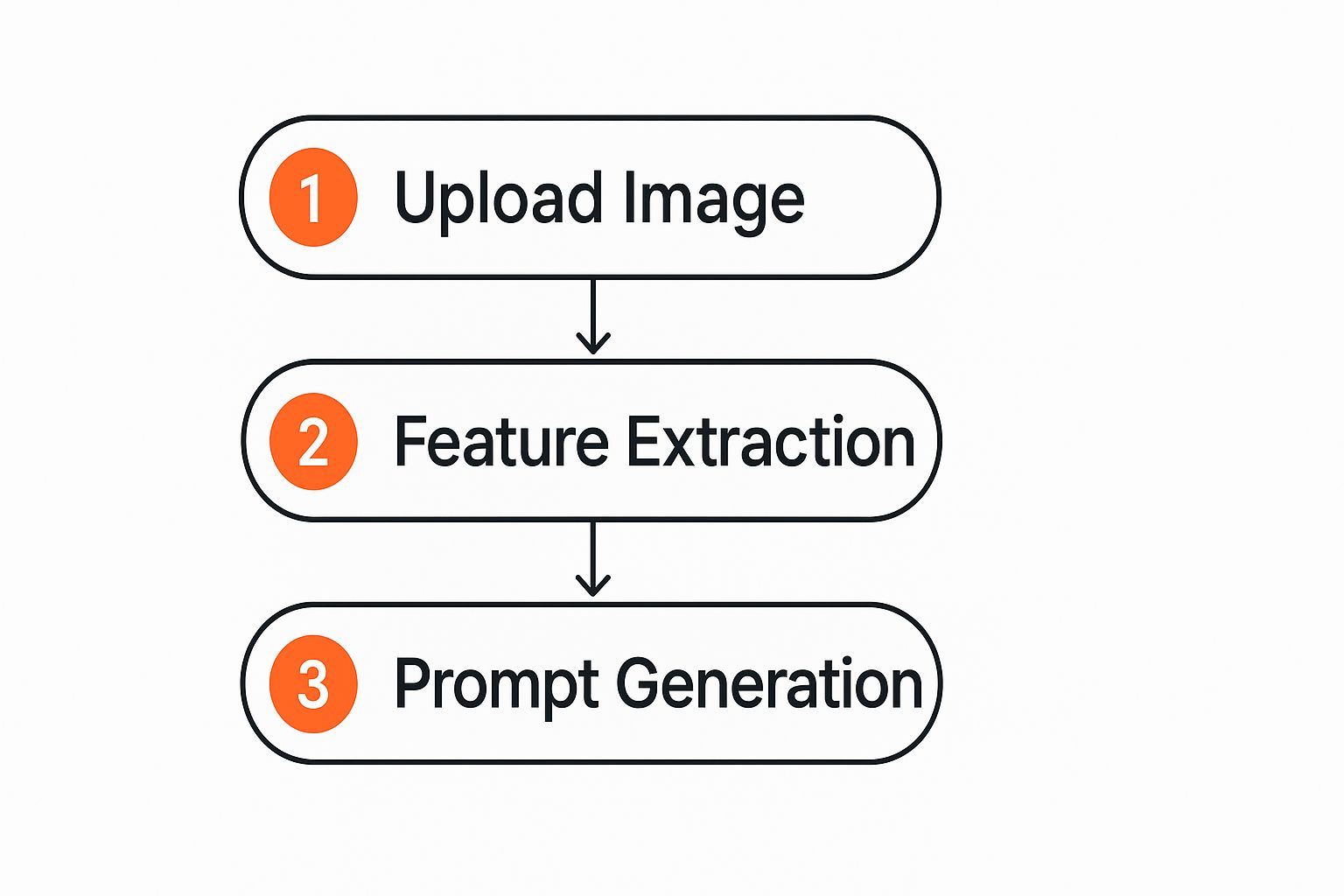
Essentially, the system first digests your image, then pulls out the key visual features before piecing together the final text prompt for you.
When the prompt appears, your job is to interpret it. Remember, the AI isn’t just writing a caption; it’s building a set of creative instructions.
Practical Example: Imagine you upload a photo of a woman working on her laptop in a lively Lagos café.
- A weak prompt might say: “A woman using a computer.”
- A strong prompt from a good image-to-prompt tool would be much more specific: “A professional Nigerian woman typing on a modern laptop, sitting at a rustic wooden table in a bustling café with warm, ambient lighting, a cup of coffee nearby, shot from a side angle.”
This second, more detailed prompt is far more powerful. It gives you specific keywords and phrases (“rustic wooden table,” “ambient lighting”) that you can use to generate new AI art, write compelling social media posts, or even map out a blog article.
The goal isn’t to get a perfect, word-for-word description. You’re looking for a creative launchpad. Treat the generated text as raw material—copy it, edit it, and mix it with your own ideas. This is just one of many ways you can speed up your creative workflow. For more inspiration, you might find it useful to explore other free AI tools for content creation that can support your projects.
Ultimately, the key is to see this as a collaboration between you and the AI, sparking ideas you might never have thought of on your own.
Refining Your Raw Prompt for AI Art Generators
Getting a basic description from an image is a brilliant starting point. But the real magic happens when you take that raw text and sculpt it into a powerful, precise instruction for an AI art generator. This is where you move beyond simple outputs and start creating something truly special.

Think of the initial text from a tool like RichlyAI Hub as your lump of clay. It has the core substance, but it’s on you to give it shape and definition. This involves adding specific modifiers that steer the AI directly toward the vision in your head.
A Step-by-Step Guide to Refining Prompts:
Let’s walk through a practical, step-by-step example. Say your initial image to prompt conversion gives you this raw text: a portrait of a man.
That’s our base. Now, let’s refine it step-by-step to get a much more compelling result.
- Step 1: Add a Specific Art Style. This tells the AI what artistic tradition to follow.
- Example prompt:
a portrait of a man, **in the style of Hayao Miyazaki**
- Example prompt:
- Step 2: Define the Medium. Are you looking for a photo, a painting, or something else?
- Example prompt:
a portrait of a man, **hyperrealistic photo**
- Example prompt:
- Step 3: Include Lighting Commands. Lighting dramatically affects the mood.
- Example prompt:
a portrait of a man, **cinematic lighting, dramatic shadows**
- Example prompt:
- Step 4: Specify the Camera Angle. This controls the perspective and power dynamic.
- Example prompt:
a portrait of a man, **low-angle shot, looking up**
- Example prompt:
Actionable Insight: Every small tweak gives the AI a much clearer set of instructions. You can even stack these modifiers for more complex and nuanced creations, like: a portrait of a man, hyperrealistic photo, low-angle shot, cinematic lighting. If you want to go deeper, there are some great strategies for writing effective AI prompts that can really elevate your game.
Inject Emotion and Mood
Beyond just the technical commands, you can guide the AI with words that convey a certain feeling or atmosphere. This is often what separates a good image from a great one. These keywords help the AI capture a specific mood, which is the soul of the artwork.
Imagine you’re generating a landscape. Instead of just asking for “a forest,” try using words that paint an emotional picture.
Before:
A forest with trees and a path.
After:A **serene** and **misty** forest at dawn, ancient moss-covered trees, a narrow winding path disappearing into the fog, **peaceful and quiet**.
See the difference? The “after” prompt doesn’t just describe a place; it tells a story and sets a mood. This is the heart of effective prompt engineering—guiding the AI to not only see what you want but to feel it, too.
Practical Ways to Use Image Prompts
Alright, let’s get down to the brass tacks. Beyond the tech itself, where does turning an image into a prompt actually help in your everyday work? Here are some actionable examples for different professional roles.
For E-commerce Entrepreneurs:
Picture this: you’re running a small online clothing store in Nigeria. You have a new collection, which means dozens of product descriptions to write.
- Actionable Step: Upload your product photos to an image-to-prompt tool. The AI will instantly give you rich, detailed descriptions that capture the texture of the fabric, the specific colour shade, and the cut. This simple step saves you a massive amount of time and makes your product pages far more appealing to both customers and search engines.
For Content Creators and Marketers:
Content creators and social media managers know the struggle all too well—the constant pressure to come up with fresh ideas can be draining.
- Actionable Step: Feed a single stock image into RichlyAI Hub. A picture of a bustling Lagos market, for example, could spark prompts about local entrepreneurship, cultural stories, or the food scene. Suddenly, you have multiple content angles from one simple visual cue. It’s a fantastic way to keep your online presence active and engaging, a principle that’s just as vital when deploying AI Chatbots.
For Creative Project Managers (Game Dev, Branding):
In any creative project, consistency is king. A game developer can take a piece of concept art—say, a key character or environment—and generate a detailed prompt from it.
- Actionable Step: Use the generated prompt as the “master guide” for creating all other related assets, ensuring every prop and texture fits perfectly within the same visual world. This ensures different artists, or even different AI tools, produce work that feels cohesive.
Think of it as a “style lock.” It translates a single artistic vision into a reusable, descriptive formula. The same idea works wonders for branding. Take images from your most successful marketing campaign and turn them into prompts that define your brand’s visual style.
This isn’t just about creating art from scratch. It has very real uses for personal branding, too. The explosion of AI profile picture generators is a perfect example of how translating an idea or an existing photo into a directed prompt can produce specific, high-quality results that help shape our digital identities. It’s another way this technology delivers real value.
Troubleshooting Common Prompting Issues
Let’s be real—even the most sophisticated AI isn’t a mind-reader. You’re going to run into moments where your image to prompt tool spits out something that’s too vague, completely misses the point, or just feels… off. Don’t sweat it. The trick isn’t finding a perfect tool, but learning how to nudge the AI back in the right direction.
Fixing Vague or Generic Prompts
One of the most frequent hiccups is getting a prompt that’s just too generic. Picture this: you upload a vibrant, detailed photo of a bustling market in Abuja, and the AI gives you back, “people walking outside.” Here’s how to fix it.
- Actionable Tip 1: Use Higher-Quality Images. A crisp, high-resolution photo with great lighting gives the AI more visual information to analyse. More detail in, more detail out.
- Actionable Tip 2: Pre-edit for Focus. Try giving your image a quick once-over before uploading. A slight boost in contrast or saturation can make your key elements stand out, guiding the AI’s ‘eye’ to what matters most.
- Actionable Tip 3: Start with Simpler Compositions. If your image is incredibly busy, the AI can sometimes get confused. When you’re just starting, try using photos with one clear, undeniable subject to see how the tool behaves.
When the AI Fixates on the Wrong Thing
Ever had an AI get obsessed with the background? You upload a brilliant portrait, and the resulting prompt describes the floral wallpaper in painstaking detail while barely mentioning the person in front of it.
The Fix: Use Strategic Cropping.
By cropping your image tightly around the main subject before you upload it, you essentially force the AI’s attention where you want it. You’re removing all the noise and telling the model, “Hey, look here. This is the important part.”
This simple pre-editing step is often all it takes to shift the AI’s focus from the background trees to the person in the foreground. It’s a simple, powerful way to take back control. Understanding these little nuances is a huge part of mastering AI for content creation and getting the results you actually want.
This hands-on skill is especially vital in emerging markets like Nigeria, where businesses are still navigating the best ways to adopt AI. We know challenges like cost and complexity are real—a recent study found 64% of businesses in similar regions see cost as a major barrier. But when you learn to expertly guide these tools, you immediately boost their value and prove their worth, making the investment much easier to justify. You can read the full study on AI adoption challenges for more on that.
Your Questions on Image-to-Prompt Answered
Diving into the world of AI art and prompt generation can feel a little intimidating at first, and it’s natural to have a few questions. Let’s walk through some of the most common things people ask when they’re learning how to turn an image into a powerful prompt.
Can I Use Just Any Photo for a Good Prompt?
Not really. While you can technically upload almost any image, the quality of the prompt you get back is directly tied to the quality of the picture you provide.
Actionable Insight: For the best results, always aim for clear, high-resolution images where the main subject is easy to see. If you feed the AI a blurry, poorly lit photo with a jumbled background, you’ll likely get a prompt that’s equally vague and confused. Think of it this way: a sharp, well-composed image gives the tool far more detailed visual data to work with, which leads to a much richer and more accurate prompt.
How Accurate Are AI-Generated Prompts?
This is a great question, and it’s important to set your expectations correctly. An AI-generated prompt is best seen as a creative starting point, not a flawless, word-for-word description. The AI’s job is to break down the essence of your image—its style, mood, and core elements—to spark a new idea.
Practical Tip: Treat the AI’s output as a very smart first draft. Your role is to then step in to tweak, add details, and refine it until it perfectly captures what you have in mind. The real magic happens when you add your own touch.
Are Image-to-Prompt Tools Difficult for Beginners?
Absolutely not! Modern platforms like the RichlyAI Hub are built to be incredibly user-friendly. Honestly, the learning curve is much gentler than you might think. If you know how to upload a photo to social media, you already have all the technical skills you need to get going. The key is just to jump in and experiment.
Once you get the hang of it, you’ll find that these skills are surprisingly versatile. Many of our users find that mastering creative AI tools gives them a great foundation for other ventures, which you can explore in our guide on how to start an online business.
It’s also useful to remember the difference between a prompt and a simple description. A caption is for a human reader, but a generative prompt is written for another AI, using specific keywords and technical phrases to give it precise instructions.
Ready to stop wondering and start creating? RichlyAI gives you the power to transform your visual ideas into powerful text with our intuitive Image to Prompt generator. Sign up for a free plan and see how easy it is to spark your next big idea with RichlyAI.
