
Getting started with ChatGPT is actually quite simple. The best way to think about it is like sending a message to a very knowledgeable colleague – the clearer and more direct you are, the better the response you’ll get back. Let’s walk through the exact steps.
Step-by-step guide to signing up:
- Go to the ChatGPT website: Open your web browser and navigate to the official OpenAI ChatGPT page.
- Click ‘Sign Up’: You’ll see an option to create a new account.
- Enter your details: You can sign up with an email address or use your Google, Microsoft, or Apple account for a quicker process.
- Verify your account: Check your email for a verification link to activate your account.
- Start chatting: Once verified, you’ll be taken to the main chat interface, ready for your first prompt.
Your First Conversation with ChatGPT
Jumping into ChatGPT for the first time is less about a complicated technical setup and more about figuring out a new way to communicate. Once you’ve signed up, you’re greeted by a clean, simple dashboard designed for immediate use.
You’ll notice the screen is mostly just a big prompt input bar at the bottom. That’s where the magic happens. Over on the left, you’ll see your conversation history, which is brilliant for jumping back into previous chats to continue where you left off or just to keep different projects organised.
Free vs Paid Tiers
Before you get too deep, it’s worth knowing the difference between the free and paid plans. The free version is surprisingly powerful and more than enough for most day-to-day things.
With the paid tier, ChatGPT Plus, you’re essentially paying for a few key upgrades:
- Access to more advanced models, like GPT-4, which tend to give more accurate and creative responses.
- Faster response times, which is a big help when the service is busy.
- Priority access to new features and tools as soon as they’re released.
Honestly, if you’re just learning the ropes, the free version is the perfect place to start. You can get a great feel for what it can do without spending a penny.
Pro Tip: Keep your first few prompts simple. This isn’t about testing the AI’s limits just yet, but more about understanding how it interprets what you say and structures its answers. It builds a good foundation for when you start giving it more complex tasks.
Let’s try a straightforward first task. Go to the input bar and type a clear, simple request.
Practical Example: Ask it to summarise a recent news article.
- Find a news article online and copy its URL.
- Go to ChatGPT and type the following prompt: “Summarise the main points of this article in three bullet points: [paste the URL here]”
- Press Enter and watch it generate a concise summary. This is a great first step because it shows you how it can pull out key information and present it clearly.
You can actually start your AI journey right now with our free AI chat tool at RichlyAI.
The Art of Writing Prompts That Work
Think of ChatGPT as a brilliant but very literal assistant. The quality of what you get out of it is a direct reflection of what you put in. Mastering the art of writing a good prompt is the single most important skill you can develop—it’s the difference between a bland, generic answer and a response that’s genuinely useful.
This is a great visual for breaking down how to structure a prompt to get better results.
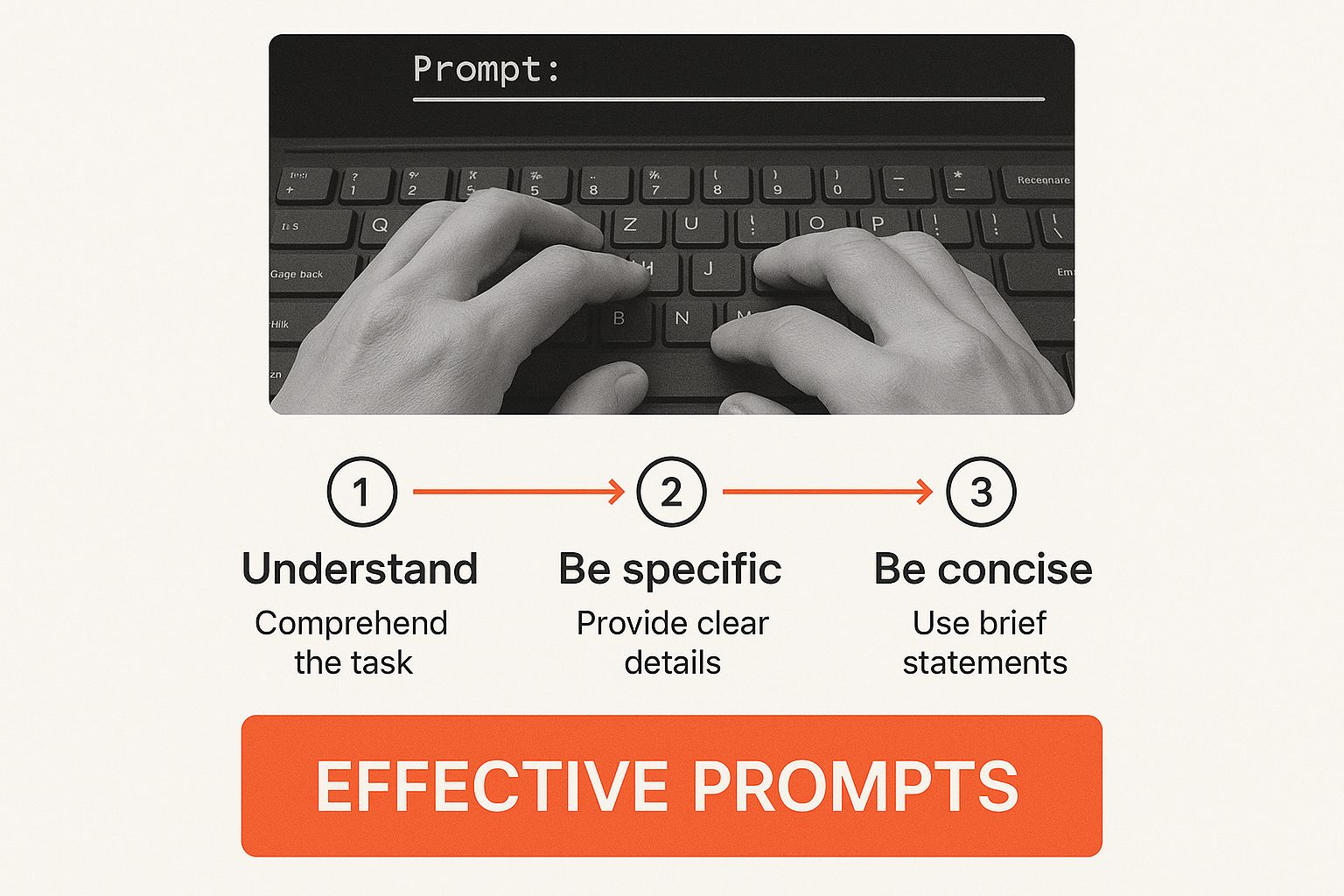
The takeaway here is to stop asking simple questions and start giving clear, direct instructions. You’ll get much further by giving the AI a role to play, some background on your request, and a specific format for the output.
Give ChatGPT a Role and Context
A game-changing habit to get into is starting your prompt by telling the AI who it should be. Assigning a role, or a persona, immediately frames the entire conversation and helps it adopt the right tone and level of expertise.
Practical Example: Instead of vaguely asking it to “write about social media,” try this actionable prompt:
“Act as a social media marketing expert for a small fashion brand based in Lagos. My target audience is young women aged 18-25. Generate three engaging Instagram post ideas for our new summer dress collection.”
See the difference? That one tweak provides a persona, a target audience, and an industry, which helps it generate far more relevant ideas. This approach is incredibly popular in Nigeria, where content creation makes up an estimated 55-60% of user activity.
Specify the Format and Desired Output
Never assume ChatGPT knows how you want the information delivered. You have to be explicit. Do you need a bulleted list? A professional email? A comparison table, or a casual social media caption? Tell it exactly what you need.
Here are a few quick examples of how to add formatting instructions:
- For a product description: “Write a 100-word product description for a new coffee blend. Use a persuasive tone and end with a call to action.”
- For a comparison: “Create a table comparing the pros and cons of an iPhone 15 vs. a Samsung S23. Include rows for camera, battery life, and price.”
- For a draft email: “Draft a follow-up email to a potential client named John Doe after our meeting yesterday. The tone should be professional but friendly, and the goal is to schedule a demo.”
The table below shows just how much of an impact a little detail can have.
Weak vs. Strong Prompt Comparison
| Task | Weak Prompt Example | Strong Prompt Example |
|---|---|---|
| Email Marketing | Write a marketing email. | Act as a marketing manager. Write a 200-word email to our subscriber list announcing a 24-hour flash sale on all winter jackets. Use an excited, urgent tone and include a clear call-to-action button. |
| Social Media | Create a tweet about our new product. | You are a social media specialist for a tech startup. Craft three different Twitter posts to announce our new productivity app. Include the hashtag #ProductivityHacks and a link to our website. |
| Blog Post Idea | Give me some blog ideas. | I run a blog for beginner home cooks. Generate five blog post titles that are SEO-friendly and focus on easy, 30-minute dinner recipes. The target audience is busy parents. |
As you can see, the strong prompts provide the necessary guardrails for the AI to produce something that requires far less editing on your end.
A great prompt isn’t just a question; it’s a comprehensive brief. It includes the role, the task, the context, the audience, and the desired format. The more detail you provide upfront, the less you’ll have to edit later.
For anyone looking to weave this into a broader marketing plan, it helps to understand the principles of a robust content strategy. Knowing your goals and audience before you even start prompting is half the battle. Our team is committed to helping creators make this connection, which you can read more about us at Richly AI.
Practical Ways to Weave ChatGPT into Your Daily Routine
ChatGPT is much more than just a novelty; it’s a powerful tool that can genuinely make your day-to-day work easier. Once you get the hang of using it for common tasks, you’ll find yourself saving time, pushing past creative blocks, and generally getting more done. Here are some actionable ways to use it.
Your Go-To for Brainstorming
We all get stuck. Instead of staring at a blank screen, you can use ChatGPT as a creative sounding board to get the ball rolling on pretty much any topic.
Actionable Insight: Use ChatGPT to generate a list of 10 ideas, knowing that even if only two are good, you’re still ahead.
Practical Example: Let’s say you’re a small business owner in Nigeria. You could try a prompt like this:
“Act as a marketing expert. I sell handmade leather bags in Lagos. Give me five creative ideas for an Instagram Reels campaign to attract customers aged 20-35.”
A simple request like this can deliver concrete marketing ideas in seconds, helping you move from stuck to action. It’s no surprise that in Nigeria, tools like ChatGPT are catching on fast. In major cities, mobile app downloads for AI chatbots have jumped by about 50% each year.
A Helper for Writing and Learning
Beyond just sparking ideas, ChatGPT is brilliant at helping you fine-tune your writing. You can use it to polish up important emails, get the gist of long reports, or break down complicated topics.
Here’s a step-by-step guide for polishing an email:
- Draft your email: Write the core message you want to send in your own words.
- Copy the draft: Highlight and copy the entire text.
- Create a prompt: In ChatGPT, type: “Review and improve the following email draft. Make it sound more professional but still friendly. Here is the draft:”
- Paste your text: Paste your draft email after the prompt.
- Review the output: ChatGPT will provide a revised version. Use it as is, or pick the parts you like best.
This process also works for summarizing articles or explaining complex topics, like asking it to “Explain blockchain to me like I’m 10 years old.” It can also slot into bigger workflows, like using AI to take meeting notes, which is a huge time-saver.
If you’re ready to give these a go, you can sign up for a free account at Richly AI and start experimenting yourself.
Advanced Techniques for Power Users
Once you’ve got the hang of basic prompts, it’s time to start using strategies that turn ChatGPT from a handy tool into a genuine creative partner. These techniques are all about getting more precise, consistent, and genuinely useful results.

One of the most powerful ways to do this is with Custom Instructions. This feature is a real game-changer, letting you give ChatGPT permanent context about who you are and how you expect it to respond across all your future chats.
Setting Up Your Custom Instructions
Think of Custom Instructions as a pre-briefing that ChatGPT reads before you even type your prompt. You set it up once, and it remembers your preferences.
Step-by-step guide to setting up Custom Instructions:
- Click on your name in the bottom-left corner of the ChatGPT interface.
- Select “Custom Instructions” from the menu.
- You’ll see two boxes. Fill them out with your preferences.
- Click “Save”.
Here’s a practical example for a small business owner in Nigeria:
- What would you like ChatGPT to know about you to provide better responses? “I’m the founder of a small e-commerce business in Abuja, Nigeria, selling handmade jewellery. My target customers are professional women, typically between 25-40 years old.”
- How would you like ChatGPT to respond? “Your tone should always be professional but friendly. Please use Nigerian English. Keep your answers concise, and use bullet points for any lists. Steer clear of technical marketing jargon.”
With this setup, every single output is automatically tailored to your specific context. It’s a massive time-saver.
Use Constraints to Steer Complex Tasks
When you’re dealing with more complex jobs, you need to set clear boundaries. This means telling the AI not just what you want, but also what you don’t want. These are often called negative prompts or constraints.
Practical Example: Let’s say you’re a content creator outlining a blog post.
“Generate a 5-point outline for a blog post titled ‘How to Use ChatGPT for Beginners.’ Focus on practical, actionable tips. Do not include a history of AI or technical jargon. The tone should be encouraging for a non-technical audience.”
By spelling out what to avoid, you guide the AI towards a far more accurate and reliable answer. This isn’t just for writing. You can apply the same logic to brainstorming marketing ideas (“Focus on low-budget strategies; avoid paid ads”) or writing code (“Use the BeautifulSoup library, but do not use requests-html”). These constraints put you firmly in the driver’s seat.
Common Mistakes and How to Avoid Them
Getting the most out of ChatGPT isn’t just about writing good prompts; it’s also about understanding its limitations and sidestepping common pitfalls.
One of the biggest traps is taking every word it says as gospel. Remember, the AI is a language prediction model, not an all-knowing oracle. It’s incredibly good at sounding confident even when it’s completely wrong. This is what people in the industry call AI hallucination.
Actionable Insight: Treat every ChatGPT output as a first draft. If it provides a statistic, fact, or any other critical information, take 30 seconds to verify it with a quick Google search. This simple habit prevents embarrassing mistakes.
Don’t Forget About Privacy
This brings us to another massive point: data privacy. It’s simple, really—never, ever paste sensitive information into that chat window.
We’re talking about things like:
- Bank account details
- Passwords or login credentials
- Confidential company data or internal strategies
- Personal identification numbers
Actionable Insight: Before you paste any text, ask yourself: “Would I be okay with this being on a public billboard?” If the answer is no, don’t put it in the chat. If you ever need to manage your data and can’t get into your account, you might need to reset your password on RichlyAI login page.
Key Takeaway: Treat ChatGPT like a public forum. Don’t share anything you wouldn’t want the world to see. Your security always comes first.
The adoption of this technology is booming across Nigeria, with many businesses in Lagos and Abuja using it for everything from customer service to public sector support. You can read more about how AI is finding its place in local industries over at scoop.market.us.
Got Questions About ChatGPT? We’ve Got Answers
As you start getting the hang of ChatGPT, a few common questions always seem to pop up. Let’s tackle some of the most frequent ones.
So, Is My Data Actually Safe?
This is probably the most important question, and for good reason. By default, OpenAI uses conversations to train its models. The golden rule here is simple: never share sensitive personal or business information.
Actionable Insight: If you have ChatGPT Plus, you can go into your settings and turn off “Chat history & training.” This prevents your conversations from being used for training, adding an extra layer of privacy. For the full picture on how your data is managed, it’s worth reading our detailed RichlyAI privacy policy.
Can I Keep My Best Conversations?
Absolutely. One of the handiest features is that your chat history is automatically saved in the sidebar on the left.
Actionable Insight: To stay organized, get into the habit of renaming your chats. Click the small pencil icon next to a conversation title in the sidebar and give it a clear name like “Marketing Ideas for Q3” or “Blog Post: How to Use AI.” This makes finding past work much easier.
What’s the Real Difference Between ChatGPT 3.5 and 4?
It really boils down to power and sophistication. GPT-4, which comes with the paid plan, is a significant step up from the free GPT-3.5 model.
In practice, this means GPT-4 is much better at understanding tricky instructions, providing more accurate and creative responses, and holding a more detailed context throughout a conversation. If you’re doing complex work like coding, detailed analysis, or writing long-form content, the upgrade is often worth it. For simple tasks like summarizing text or brainstorming ideas, GPT-3.5 is usually sufficient.
Ready to see what this all looks like in action? RichlyAI gives you a powerful set of tools to create top-notch text, images, and code with ease. Come and explore what you can build today at Richly AI.
