

Removing a watermark isn’t a one-size-fits-all task. The best technique—whether it’s using a smart AI tool, carefully editing by hand, or simply cropping it out—depends entirely on your content and your goal. A simple logo on a flat background is a world away from a complex pattern spread across a detailed video. This guide provides actionable, step-by-step instructions to get a clean result, fast.
Choosing the Right Watermark Removal Method
First, a critical point: Watermarks exist to protect a creator’s intellectual property. Before you attempt to remove one, you must ensure you have the legal and ethical right to do so. Removing a watermark from content you don’t own can lead to serious copyright infringement issues. This guide is for situations where you have the right to the content, such as removing a watermark from a photo you’ve purchased or from your own work.
With that established, let’s focus on the “how.” The key is to match your removal method to the watermark and the background. Is it a solid block of text on a simple background? A faint, repeating logo over a detailed face? Each scenario requires a different approach.
Understanding Your Options
Most watermark removal techniques fall into a few key categories. Your choice will depend on your technical skill, budget, and how perfect the final result needs to be.
- AI-Powered Tools: These are your go-to for speed and convenience. Web-based services use advanced algorithms to automatically detect and erase watermarks. They’re fast, easy, and require minimal effort. Many, like those we covered in our review of Watermarkly’s capabilities, can clean up an image in just a few clicks.
- Manual Editing Software: This is the professional approach for maximum control. Tools like Adobe Photoshop or the free alternative GIMP give you pixel-level precision. Using features like the Clone Stamp or Content-Aware Fill, you can meticulously paint over the watermark using information from the surrounding area. It takes more time, but the results can be flawless.
- Specialized Online Services: These offer a balance between automated power and user-friendly design, built for the single purpose of removing watermarks from various media types.
The market for these tools is expanding rapidly. Valued at around $300 million in 2023, the global watermark removal software market is projected to reach $500 million by 2025. This growth reflects how sophisticated and accessible these tools have become. For a deeper analysis, the full Market Report Analytics study provides detailed insights.
Which Technique Should You Use?
To help you decide, here’s a quick comparison of the most common methods.
Quick Guide to Watermark Removal Methods
| Method | Best For | Difficulty | Tools |
|---|---|---|---|
| Cropping | Watermarks near the edge on non-essential parts of the image. | Easiest | Any basic image editor |
| AI Inpainting | Complex backgrounds where manual editing is too tedious. | Easy | Online AI tools, Photoshop |
| Manual Cloning | Detailed areas needing precise, seamless results. | Hard | Photoshop, GIMP |
| Blur/Overlay | Videos, to obscure a watermark without a jarring cut. | Medium | Premiere Pro, DaVinci Resolve |
Ultimately, the best method delivers a clean result without hours of frustration.
This decision tree breaks it down even further, guiding you to the right tool based on your content.
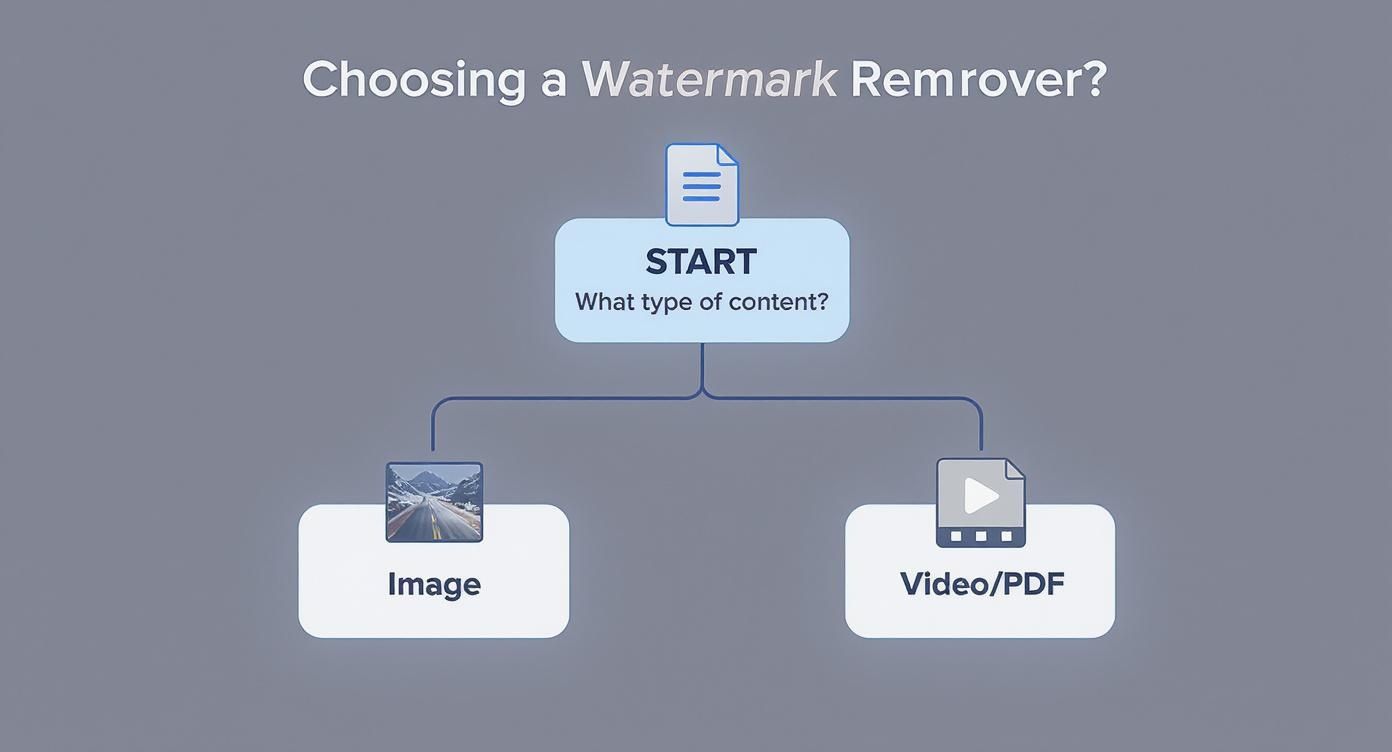
Alt text: A flowchart showing decision paths for removing watermarks. If it’s an image, choose between manual or AI tools. If a video, choose crop, blur, or overlay. If a PDF, use a PDF editor.
As you can see, the path forward changes completely depending on if you’re dealing with an image, video, or PDF. Each one brings its own set of challenges and requires a specific toolkit to get the job done right.
Mastering Manual Watermark Removal in Images
When automated tools can’t deliver a perfect, seamless finish, it’s time to take manual control. Manual editing gives you absolute command over every pixel, allowing you to meticulously erase a watermark while preserving the image’s original quality and detail. This approach isn’t about speed; it’s about precision. It’s the method professionals rely on for high-stakes work, especially on complex backgrounds like fabric, water, or detailed landscapes where AI tools often fail.
The Professional Toolkit: Adobe Photoshop
Adobe Photoshop is the industry standard for a reason. It’s packed with powerful tools designed for this kind of detailed editing. If you’re new to the software, our guide on how to use Photoshop to edit pictures is the perfect place to start.
For watermark removal, you’ll rely on these key tools:
- Content-Aware Fill: Your first choice for watermarks on simple or repeating backgrounds. Photoshop’s AI analyzes surrounding pixels and generates a seamless patch.
- Clone Stamp Tool: Your workhorse for complex details. It lets you manually sample pixels from a clean area and “paint” them over the watermark, giving you granular control.
- Healing Brush & Spot Healing Brush: A smarter Clone Stamp. They blend the texture, lighting, and shading of your sample with the target area, perfect for smoothing out imperfections.
Pro Tip: Always work on a new, transparent layer above your original image. This non-destructive workflow is your safety net. If you make a mistake, you can simply erase it from the new layer without damaging the original photo.
Practical Example: Erasing a Signature from a Textured Photo in Photoshop
Imagine you have a landscape photo with a photographer’s signature across a field of grass. An AI tool would likely create a blurry smudge. Here’s how to do it right:
- Create a New Layer: Open your image in Photoshop. In the Layers panel, click the “New Layer” icon (a square with a plus sign). All your edits will go on this layer.
- Select the Watermark: Choose the Lasso Tool from the toolbar. Draw a loose selection around the signature, leaving a small buffer around it.
- Try Content-Aware Fill: Go to
Edit > Content-Aware Fill. In the dialog box, Photoshop will show you a preview. If the grass pattern is fairly uniform, this may solve 90% of the problem. Click “OK” to apply. - Refine with the Clone Stamp: Select the Clone Stamp Tool (shortcut “S”). Set its hardness to around 20% for a soft edge. Hold
Alt(orOptionon Mac) and click on a clean patch of grass near the edit to sample it. Now, carefully paint over any remaining traces of the signature. Crucially, re-sample frequently from different nearby spots to avoid creating a repetitive, unnatural pattern. - Blend with the Healing Brush: Select the Healing Brush Tool. Gently dab over any hard edges or areas where your cloning looks obvious. This final touch will blend the lighting and color, making your edit completely invisible.
The Free and Powerful Alternative: GIMP
You don’t need a subscription to get professional results. GIMP (GNU Image Manipulation Program) is a free, open-source powerhouse with a comparable toolset.
For this job, GIMP’s key tools are:
- Heal Selection: GIMP’s equivalent to Content-Aware Fill.
- Clone Tool: Functions identically to Photoshop’s Clone Stamp.
- Healing Tool: Similar to the Healing Brush for seamless blending.
The workflow in GIMP is nearly identical to the Photoshop method. For quick fixes without installing software, you can also use web-based tools like Screenshotwhale’s Editor right in your browser.
Actionable Takeaways
- Start with AI Fill: Always try Content-Aware Fill (Photoshop) or Heal Selection (GIMP) first. It can save you a lot of time.
- Work on Separate Layers: This is the golden rule of non-destructive editing. It lets you experiment and easily fix mistakes.
- Sample, Sample, Sample: When using the Clone Stamp, continuously grab new source points to avoid creating unnatural, blotchy patterns.
- Zoom In: Don’t be afraid to zoom in to 200% or 300%. The best, most invisible edits happen at the pixel level.
- Use a Soft Brush: A soft-edged brush for cloning and healing helps your edits blend naturally into the surrounding image.
Using AI Tools for Effortless Watermark Removal
When you need a clean image fast and don’t want to get bogged down with manual editing, AI-powered tools are your best bet. These platforms use smart algorithms to find, analyze, and erase watermarks in seconds, making them a fantastic option for quick tasks, especially if you’re not a Photoshop expert.
They work through a process called “inpainting.” Trained on millions of images, the AI identifies common watermark patterns (text, logos, etc.) and intelligently fills the space with what it predicts the background should look like, creating a seamless patch.
A Step-by-Step Walkthrough with an Online AI Tool
The process is remarkably simple across most web-based services. Here’s what to expect:
- Navigate to the Website: Open a tool like WatermarkRemover.io.
- Upload Your Image: Drag and drop your watermarked image into the upload area or click the button to select it from your computer.
- Let the AI Work: The tool automatically scans the image, identifies the watermark, and processes the removal. This usually takes only a few seconds.
- Review and Download: You’ll see a before-and-after comparison. If you’re happy with the result, click the “Download” button to save the clean version.
The interface for a tool like WatermarkRemover.io is a perfect example of this simplicity.

Alt text: Screenshot of the WatermarkRemover.io homepage, featuring a large “Upload Image” button and a clean, minimalist design.
There’s no friction here. The design guides you to upload an image and get an immediate result without needing a single instruction.
The Big Trade-Off: Speed vs. Perfection
While AI tools are incredibly fast, they aren’t always perfect. You might notice slight blurring, smudging, or artifacts where the watermark used to be, especially if the background is highly detailed or lacks a repeating pattern. For a quick social media post, these minor flaws are often unnoticeable. For professional, high-resolution work, they may be a deal-breaker.
The growing demand for these tools is no surprise. The global AI watermarking market is expected to explode from USD 535.1 million in 2025 to over USD 5.1 billion by 2035, driven by the increasing need to protect digital assets.
Top AI Watermark Remover Tools Compared
Not all AI removers are created equal. They differ in their algorithms, pricing, and features. To understand how AI is changing visual media, it’s worth reading about AI integration in post-production.
Here’s a comparison to help you choose the right tool:
| Tool Name | Key Feature | Pricing Model | Best For |
|---|---|---|---|
| WatermarkRemover.io | Incredibly simple and fast. | Freemium (Free with limits, paid for high-res) | Quick, one-off removals when you’re in a hurry. |
| HitPaw | Batch processing and video support. | Subscription | Removing watermarks from a whole folder of files at once. |
| Fotor | Integrated photo editor with other AI tools. | Freemium | People who need more than just watermark removal. |
| Aiseesoft | High accuracy with minimal artifacts. | Paid (Free Trial) | Getting a better-quality result on complex backgrounds. |
Actionable Takeaways
- Choose AI for Speed: It’s the best option when getting it done fast is more important than absolute perfection.
- Always Inspect the Result: Zoom in on the edited area to check for smudging or unnatural textures before using the image.
- Try Multiple Tools: If one AI tool leaves artifacts, try another. Different algorithms may handle your specific image better.
- Know Their Limits: AI struggles when a watermark covers a unique, detailed area like a person’s face. For those jobs, manual editing is still superior.
- Look for Batch Processing: If you have dozens of watermarked images, find a tool that can process them all at once to save a massive amount of time.
Dealing with Watermarks on Videos and PDFs
Moving from static photos to dynamic content like videos or structured documents like PDFs requires a different strategy. You can’t edit a video frame by frame, and PDFs often have a layered structure that you can exploit.
The market for these specialized tools is booming. The global watermark removal software industry is expected to hit $500 million in 2025 and grow at a rate of about 15% per year through 2033, driven by the explosion of digital content. You can explore these trends in the Data Insights Market research.
How to Handle Watermarks in Your Videos
Since a video is thousands of images stitched together, editing each frame is impractical. The goal is to conceal or remove the watermark from the entire clip at once. Here are three effective methods:
- Crop the Frame: If the watermark is near the edge, this is your simplest solution. In any video editor like Adobe Premiere Pro, use the crop effect to zoom in slightly and reframe the shot, pushing the watermark out of view. You’ll lose a bit of resolution, but it’s a clean fix.
- Blur It Out: If the watermark is in the middle of the frame, cropping isn’t an option. Instead, use a targeted blur. In an editor like Premiere Pro or DaVinci Resolve, draw a mask (a rectangle or circle) over the watermark and apply a blur effect (like Gaussian Blur) only to that area. It obscures the watermark without being too distracting.
- Cover It with an Overlay: A creative solution is to place your own graphic—like your logo, a title, or a lower-third—directly over the watermark. This is common on social media for repurposing clips. Instead of hiding the watermark, you’re swapping it with your own branding.
Expert Tip: If a watermark moves, use keyframes in your video editor to animate the blur mask’s position. This ensures the mask follows the watermark perfectly throughout the clip for a professional-looking effect.

Alt text: A split-screen image demonstrating watermark removal in video. The left side shows a video frame with a watermark. The right side shows the same frame with the watermark effectively blurred.
For more automated solutions, it’s also worth checking out the new wave of AI tools for video editing.
Removing a Watermark from PDF Files
PDFs are different. Unlike a “flattened” image, many PDFs are built in layers, with the watermark existing as a separate object on top of the text and images.
The Pro Method: Adobe Acrobat Pro
If you have a subscription to Adobe Acrobat Pro, removing a watermark is incredibly simple.
- Open the PDF in Acrobat Pro.
- Click the “Edit PDF” tool in the right-hand panel. This makes all document elements editable.
- In the top toolbar, click “Watermark” and select “Remove” from the dropdown menu.
- Acrobat will scan the file and ask for confirmation. Click “Yes”, and the watermark will vanish from every page, leaving the original document quality intact.
The Free Alternative: Online PDF Editors
If you don’t have Acrobat Pro, you can use a free online PDF editor as a workaround. These tools typically don’t have a dedicated “remove watermark” button, so you’ll have to cover it up manually. Upload your PDF, use the “Shapes” tool to draw a white rectangle over the watermark, and then save or “flatten” the PDF. This doesn’t truly remove the watermark, but it hides it from view, which is often sufficient.
Understanding the Ethics of Watermarked Content
Knowing how to remove a watermark is a technical skill, but knowing when you should is an ethical responsibility. A watermark isn’t just a visual element; it’s a creator’s signature. It signifies ownership and protects their work from unauthorized use. Just because you can remove it doesn’t mean you should.
Removing a watermark without the creator’s permission can be a direct violation of copyright law, leading to significant legal penalties. The only legitimate time to remove a watermark is when you have purchased the rights to the content or have explicit permission from the owner.
Safer, Smarter Alternatives to Watermark Removal
Instead of navigating a legal gray area, the best approach is to source your content ethically. This keeps you legally compliant and supports the photographers, artists, and designers whose work you admire.
- Buy a License: Marketplaces like Adobe Stock, Getty Images, and Shutterstock offer millions of professional images and videos. When you purchase a license, you receive a clean, high-resolution file and fairly compensate the creator.
- Explore Royalty-Free Platforms: For tighter budgets, sites like Unsplash, Pexels, and Pixabay offer vast libraries of high-quality content that is free to use, even for commercial projects.
- Contact the Creator Directly: If you find a watermarked image you love, try reaching out to the creator. Many are willing to sell a license directly or grant permission for specific uses, especially for non-profit or educational projects.
Actionable Takeaways
- Respect Copyright: Always assume watermarked content is protected. Your next step should be to acquire the rights, not remove the mark.
- Invest in Licensed Content: For professional work, purchasing licenses from stock sites is a small investment for legal peace of mind.
- Use Free Resources Responsibly: For personal blogs or social media, royalty-free sites like Unsplash are excellent, ethical choices.
- Prioritize Permission: When in doubt, ask the creator. Sourcing content legally is always the most professional and risk-free approach.
- Apply Ethical Principles: These choices are part of a larger conversation about making ethical AI in daily decisions.
Questions We Hear All the Time About Watermark Removal
Here are answers to the most common questions about removing watermarks.

Alt text: A person sits at a desk, looking thoughtfully at a laptop screen, appearing to consider a complex question.
Is It Actually Legal to Remove a Watermark?
It is legal only if you own the content or have explicit permission from the copyright holder. Removing a watermark from content you don’t have the rights to is a violation of copyright law. For example, if a photographer sends you watermarked proofs for review, it is illegal to remove the watermarks. Once you purchase the photos, you receive the clean versions and have the right to use them. It all comes down to ownership and permission.
What’s the Best Free Watermark Remover Out There?
The “best” free tool depends on your needs:
- For detailed image editing and control: GIMP is the undisputed winner. It’s a powerful, open-source program with professional tools like Clone and Heal that rival paid software.
- For a quick, automated fix: An online tool like WatermarkRemover.io is fantastic for images with simple backgrounds where speed is the priority.
Be aware that many “free” online tools may limit download resolution or display ads.
Can AI Really Remove Any Watermark Perfectly?
No, not yet. AI is incredibly effective on simple or repeating backgrounds (like sky or grass) but struggles with:
- Complex Details: It often leaves a blurry mess if a watermark covers a face or intricate pattern.
- Unique Textures: AI can’t convincingly recreate non-repeating textures.
- Faint or Transparent Logos: Subtle, semi-transparent watermarks can be difficult for an AI to detect and remove cleanly.
For perfect results on complex images, manual editing remains the superior method.
How Do You Deal With Those Annoying Repeating Watermarks?
Tiled watermarks that cover an entire image are the toughest challenge. There is no single-click solution. The most effective approach combines methods:
- Start with an AI Tool: Run the image through an AI remover to reduce the overall pattern and make it less prominent.
- Switch to Manual Editing: Open the image in Photoshop or GIMP.
- Painstakingly Clone and Heal: Use the Clone Stamp and Healing Brush to manually sample clean areas and paint over each instance of the remaining watermark. This is a slow, detailed process that requires patience.
Tools & Resources
- Manual Editing: Adobe Photoshop, GIMP
- AI Removers: WatermarkRemover.io, HitPaw, Fotor
- Video Editors: Adobe Premiere Pro, DaVinci Resolve
- PDF Editor: Adobe Acrobat Pro
Further Reading
- How to Use Photoshop to Edit Pictures – RichlyAI
- Ethical AI in Daily Decisions – RichlyAI
- Understanding U.S. Copyright Law – U.S. Copyright Office
Finding the right AI tool for your project can be a game-changer. At RichlyAI LLC, we’ve built the AI Tools Hub to help you discover and compare thousands of solutions in one place. Explore our directory to find your next favorite tool.