

Please follow the instructions below to set up AI Social Media Automation.
Step 1: Connecting Social Media Platforms
Each user can connect the social media platforms they need for scheduling posts. Currently, we support Twitter(X), LinkedIn and Instagram.

1. Connecting LinkedIn
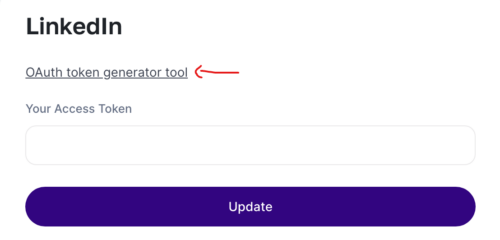
- Click on the OAuth token generator tool link.
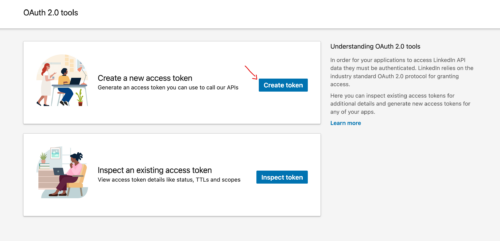
- Generate an OAuth token by creating a new access token in the “Create a new access token” menu after setting up your app.
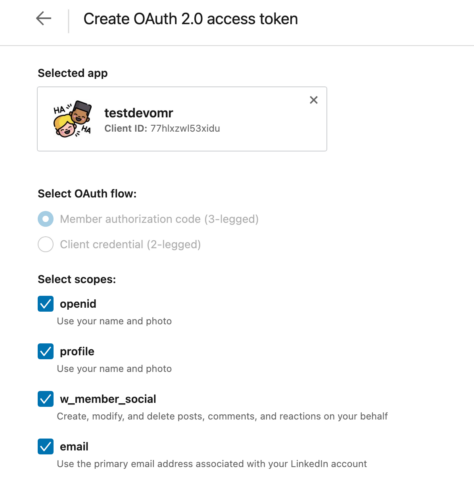
- Select the following scopes:
-
- openid (Use your name and photo)
- profile (Use your name and photo)
- w_member_social (Create, modify, and delete posts, comments, and reactions on your behalf)
- email (Use the primary email address associated with your LinkedIn account)
- Click on the “Request access token” button.

- If you encounter issues with token generation, try using a different browser.
- Copy the generated token and paste it on the LinkedIn connect page.
-
2. Connecting Twitter (X)
- Follow the steps outlined here to obtain the necessary credentials:
- API Key
- API Key Secret
- Bearer Token
- Access Token
- Access Token Secret
- Client ID
Step 2: Setting Brand Voice
After connecting your platforms, ensure to enter your company and service/product information in the brand voice page. This will personalize AI-generated social media content.

Step 3: Creating Campaigns

- Navigate to the campaign creation section.
- Define your campaign objectives, target audience, and content themes.

Step 4: Reviewing Posts

Before scheduling, review the example posts generated by the AI to ensure they align with your brand voice and objectives.
Step 5: Scheduling Posts

- Set schedules for posting, including daily, weekly, and monthly frequencies.
- Adjust posting times based on the appropriate time zone (UTC).
That’s it! You’re now ready to utilize the AI social media effectively.
Go to 'Scheduled Posts' page to see all the posts you scheduled for automation.
